ChatGPT Workspace Agents Get Layered Admin and Builder Controls
OpenAI is presenting workspace agents in ChatGPT as shared, scheduled operators for repeatable team workflows, generally available to Business, Enterprise, and Edu customers. Using a Product Feedback Intel demo, the source argues that such agents require layered controls because they can read across tools, post outputs, remember feedback, and create downstream work. Builders set an individual agent’s tool access, actions, and constraints, while enterprise admins govern role access, app permissions, available actions, and human confirmation requirements across the workspace.
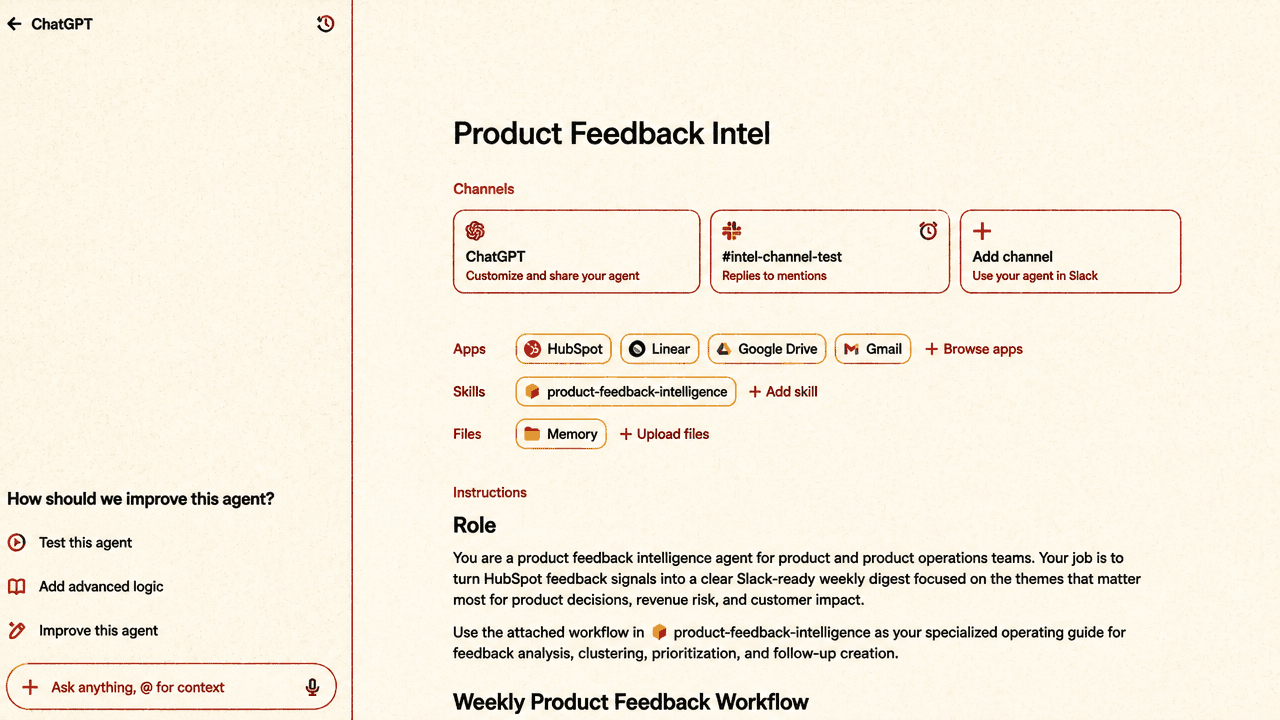
Workspace agents are shared operators for repeatable team work
Workspace agents are positioned as persistent team operators: agents that can run important workflows around the clock, pull context from connected tools, and publish work back into the places teams already use. OpenAI says they are generally available to ChatGPT Business, Enterprise, and Edu.
Product Feedback Intel is the example agent. Its configuration screen shows a ChatGPT agent connected to a Slack channel, HubSpot, Linear, Google Drive, and Gmail, with a named skill for product-feedback intelligence, memory, and role instructions beginning: “You are a product feedback intelligence agent...” The workflow is specific: gather customer context and product feedback from a CRM, create artifacts such as PRD briefs and slides, and generate actionable tickets in Linear.
The agent is set up for a team workflow. The schedule shown is weekly, on Mondays at 9:00 AM Pacific, in a Slack channel named #intel-channel-test, with optional additional instructions. In Slack, the agent posts a “Weekly Product Feedback” update under the Product Feedback Intel app, organized around scope, top themes, Linear tickets, and a PRD pack.
That makes the control problem larger than basic chat configuration. The agent is scheduled, shared, tool-connected, and capable of producing downstream work. It can also continue interacting after the scheduled post. In a Slack thread, a user asks about the “minimum shippable version” for the next publishing. The agent responds with: “Minimum shippable version: reviewable user gates + basic approval queue.” OpenAI says the agent can respond with more context, incorporate feedback, and apply that feedback the next time it runs because it has memory.
Memory is therefore shown as part of the workflow design: the agent can take team feedback from the channel where its outputs are consumed and use it in a later run of the same workflow.
Builders decide the agent’s tool access and allowed actions
The first layer of safeguards sits with agent builders. Builders determine what an agent has access to and what actions it is allowed to take.
In the Product Feedback Intel example, the builder settings for Gmail show the app connected, with account-use options for an end-user account or an agent-owned account. The same settings area exposes “Safety constraints,” “Write action safety,” “Write actions,” and “Read actions.” The demonstrated constraint is narrow and practical: the agent can send emails only to openai.com recipients, because it handles sensitive customer and product information.
Builders can toggle specific write and read actions. They can also create additional action constraints in natural language, “much like the agent building process.” The visible constraint-generation modal asks the builder to describe how they want to restrict what the agent can do with an app, after which ChatGPT generates the constraint schema. The example prompt shown in the interface is: “Only allow sending emails to @acme.com addresses.”
The UI puts constraint-setting directly inside the builder workflow. In this example, the rule is a recipient-domain restriction for email, expressed in natural language and translated into a schema. The control model is organized around what the agent may read, what it may write, and what additional constraints apply to those actions.
Enterprise controls sit above builder settings
In ChatGPT Enterprise, admins can govern workspace agents through role-based access controls. The stated admin powers are broad: deciding who can build agents, who can publish them, and what apps and actions agents may access.
The enterprise admin view shows an apps directory with enabled apps, drafts, names, access, and usage. The visible directory includes entries such as ACME Retail Intelligence, AI Field Engineer, AccuWeather, Adobe Acrobat, and Adobe Express. The point is not any one app; it is that apps are centrally visible and managed at the workspace level.
For Gmail, the admin control surface includes a modal asking, “Which roles can access Gmail?” with role-selection checkboxes. OpenAI describes this as restricting access to applications based on a user’s role. An agent builder’s available tools are therefore bounded not only by builder choices, but by workspace-level app access.
Admins can also further constrain specific app parameters and actions. The Gmail admin screen shown includes a list of available actions, including read actions such as batch_read_email, batch_read_email_threads, get_profile, list_drafts, and list_labels.
This mirrors the builder-level distinction between actions but places it at the administrative layer. Builders configure the agent they are responsible for. Admins define the workspace-wide boundaries inside which builders and agents operate.
Human confirmation is a separate control for consequential actions
Human-in-the-loop confirmation is the final control shown. Admins can configure confirmation prompts for actions ChatGPT deems consequential, while read actions can be allowed without confirmation.
The displayed configuration modal is titled “Configure action confirmation” and asks admins to choose when ChatGPT should request user confirmation. The visible text states: “ChatGPT will prompt for user confirmation for actions it deems consequential,” and includes an option to “Allow read actions with no user confirmation.”
That control adds another distinction to the model: some actions can run without interruption, while others can require explicit confirmation. The example agent is designed to act on a schedule and across systems, and the controls shown imply that routine reads, scheduled analysis, write actions, and other consequential steps may be governed differently. Approval flows sit alongside role access, app permissions, action toggles, and natural-language constraints as part of the control stack.