Codex Product Design Plugin Turns Rough Prompts Into Shareable Prototypes
OpenAI presents its Product Design plugin for Codex as a workflow for turning an early product prompt into a reviewable prototype, using a proposed ChatGPT calendar feature as the example. The source argues that the plugin’s value is not in replacing product judgment but in forcing constraints, generating alternative directions, and then converting a selected direction into interactive software, Figma context, and a shareable Sites deployment.
The workflow starts by turning a prompt into constraints
OpenAI presents the Product Design plugin as a way to move from a rough product idea to a shareable prototype inside a Codex-driven workflow. The example is a calendar feature for chatgpt.com, started with the prompt: “Product Design help me design a calendar feature for chatgpt.com.”
The plugin does not immediately produce a finished screen. It first turns the request into a brief and asks the user to resolve three practical questions: what the calendar feature should do, what design system or visual reference it should match, and how interactive the result should be.
The user’s answers define the work. The feature should sync calendars, show events, plan tasks, and provide meeting preparation. It should match the ChatGPT.com design system, using an attached screenshot as reference. It should be a full working prototype with controls and states, not a static concept.
That exchange is the important design move. The plugin treats the initial prompt as insufficient. It asks for product scope, visual grounding, and fidelity before it starts producing directions. The resulting brief describes a native ChatGPT calendar feature with left-sidebar navigation, a calm white workspace, lightweight controls, rounded input surfaces, and “chat-first actions rather than a dense calendar-app clone.”
Design-space narrowing remains a human decision
The plugin then generates three distinct directions for the calendar feature, each with a different structure and interaction model.
The first direction, “Agenda Copilot,” is a native calendar home with synced events, open time, task planning, and a prep panel. The second, “Schedule Chat,” is a chat-first workflow where ChatGPT proposes plans, flags conflicts, and embeds calendar actions in the conversation. The third, “Planning Board,” is a week-planning workspace with draggable tasks, calendar filters, and prep readiness.
The user chooses Agenda Copilot and asks the plugin to build a prototype from that option. The model expands the design space, but the product judgment stays with the designer: compare the options, choose the interpretation, and only then turn it into software.
That distinction matters because the plugin is not presented as a replacement for design direction. It is presented as a way to make directions concrete enough that a designer can choose between them and advance one into a working artifact.
The selected direction becomes working software
From the selected Agenda Copilot direction, the plugin starts building an interactive local prototype in code. It checks the existing workspace, looks at the generated design image, and scaffolds the prototype without overwriting the reference. It describes the implementation as “one responsive React screen with realistic mock data and local state, not static chrome.”
The plugin is shown building “realistic mock data and local state, not static chrome.”
The build is not just a visual reconstruction. The interaction layer includes calendar source toggles, agenda row selection, prep tabs, task scheduling, modal and popover controls, and chat-driven suggestions. The plugin also generates lightweight avatar assets for the prep panel and chooses Phosphor icons because they are closer to ChatGPT’s rounded line style than the default icon sets.
Validation is part of the workflow. The plugin runs a production build, opens the app locally, tests it in an in-app browser, checks different screen dimensions, and compares the local prototype against the selected reference image. The working prototype can then be opened full screen and exercised directly: meetings can be selected, feature toggles changed, panels scrolled, and the experience evaluated as an application rather than a static mock.
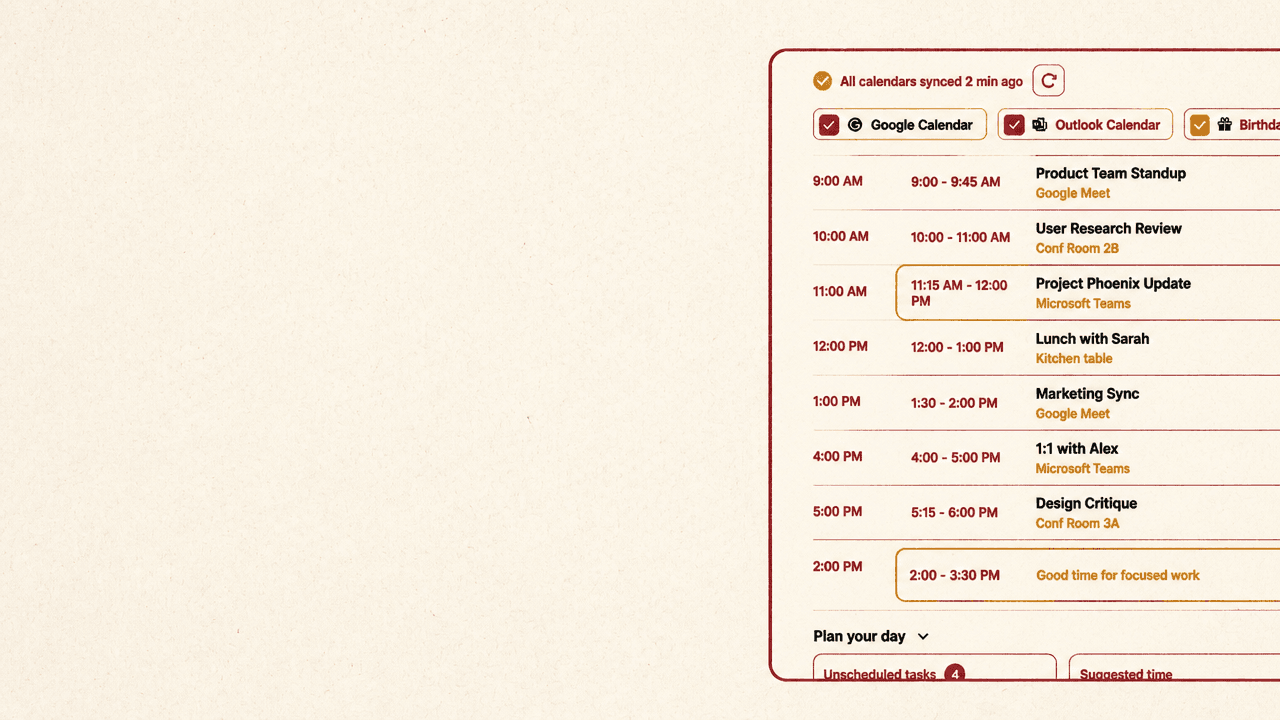
The resulting interface is a ChatGPT-style calendar surface. It includes synced calendars, a day agenda, a task-planning area, suggested focus time, and a right-side meeting-prep panel with details, prep tabs, agenda summary, related documents, and a “Prepare me” action. The point is not the specific sample schedule; it is that the design direction has become a clickable artifact with enough state and behavior to support review.
Further refinement could happen by annotating specific parts of the prototype and asking for changes. In this run, the prototype is accepted as ready to share.
Review artifacts carry context, not just pixels
The handoff path has two forms: a Figma concept page for collaborative review and a Sites deployment for broader access to the working prototype.
For Figma, the user asks the plugin to create a feature concept page in “ChatGPT New Feature Ideas” with a hero summary, prototype screenshot, key context cards, user flow, implementation checklist, and critique status. The plugin creates a page called “Feature Concept - Agenda Copilot.” In the Figma file, the page is titled “Agenda Copilot for ChatGPT.”
The visible concept decision says: “Connect calendars, surface events and tasks inside ChatGPT, and generate meeting prep without leaving the conversation. The concept treats the calendar as context, not a separate app destination.”
That line captures the product bet behind the prototype. The calendar is not positioned as a standalone calendar application copied into ChatGPT. It is treated as context inside ChatGPT: something the assistant can use to help plan, prepare, and act.
The Figma artifact is deliberately more than a screenshot. It brings the surrounding feature context into the file so the team can continue editing and refining it. The page includes the prototype screenshot, context about the user story, user flow, implementation checklist, and critique notes.
Sites serves a different review need: access to the interactive prototype itself. The user asks, “Product Design share this prototype to Sites,” and the plugin publishes the existing calendar prototype rather than creating another Figma artifact. It returns a deployed link at https://chatgpt-agenda-copilot-prototype.openai.chatgpt-team.site and says access is set to workspace_all, so active workspace members can open it.
The deployed site preserves the interactive calendar experience: the ChatGPT shell, synced calendars, day agenda, task planning, meeting-prep panel, and chat input. In the site version, the selected meeting is Marketing Sync, with an agenda summary about coordinating messaging review and outbound cadence for new project launches. The broader team can browse the prototype, click through it, and experience the proposed feature as something closer to a working product surface than a presentation slide.