Codex Turns Campaign Briefs Into Editable Marketing Assets
OpenAI’s demo presents the Creative Production plugin for Codex as a campaign-production workflow for marketing teams, rather than a standalone image generator. Using a fictional Maison Feve chocolate launch, the company shows Codex turning a brief into mood-board directions, revised visual treatments, display-ad variants and an editable Canva handoff. The argument is that marketers can use Codex to carry campaign context through concepting, asset generation and final production edits in one working thread.
Codex is positioned as a campaign-production partner, not just an image generator
OpenAI frames the Creative Production plugin for Codex as a way for marketing teams to move from campaign context to usable creative assets inside a single working thread. The example is a Maison Feve launch for a premium chocolate “Solstice Collection,” with the user asking for ideas for an upcoming marketing campaign and attaching a Google Docs brief.
The plugin’s stated purpose is to “Create business-ready visuals from brief to production asset.” In the demo, that means defining a visual direction, generating mood-board options, revising specific images, remixing stylistic treatments, producing display ads in multiple sizes, and handing an asset off into Canva as an editable file.
The setup gives the system practical constraints to work against: a brand, a product, a launch moment, a visual system, and deliverables. Codex is not presented as simply returning a finished image from a prompt; it is presented as a production environment for shaping campaign materials.
The plugin starts with creative direction
Before producing launch assets, the plugin asks the user to specify a look and feel. The mood board for “Maison Feve Solstice Collection” presents “12 single-image visual references” and organizes the choice around three questions: what the campaign should make people feel, what should appear visually, and which creative lane feels closest.
| Decision | Options shown |
|---|---|
| Desired feeling | Quiet prestige; Clear momentum; Premium focus; Calm confidence; Executive trust; Inventive energy |
| Visual elements | Work surfaces; Light trails; Human decisions; Glass interfaces; Editorial product scenes; Structured systems |
| Creative lane | Restrained luxury; Warm and useful; Sharp editorial; Futurist minimal; Material detail; Human-centered |
The user attaches cues to the thread, making the mood board part of the working context. The generated set is product-led: chocolates, packaging, chef-finishing moments, boutique counters, and launch-style compositions. The board includes directions such as “Lemon verbena shell,” “Pistachio praline,” “Strawberry rose petit gateau,” “Chef finishing detail,” “Summer table arrival,” “Private client handoff,” “Boutique retail counter,” and “Sculpted cocoa branch hero.”
The plugin also identifies which directions to carry forward. It recommends “open ivory Gift Box, Chef Finishing Detail, Summer Table Arrival, and Negative-space Launch Hero,” then proposes selecting one hero direction from the mood board and moving into variations with annotations for final campaign asset variations.
Iteration is controlled at the level of timing, lighting, and treatment
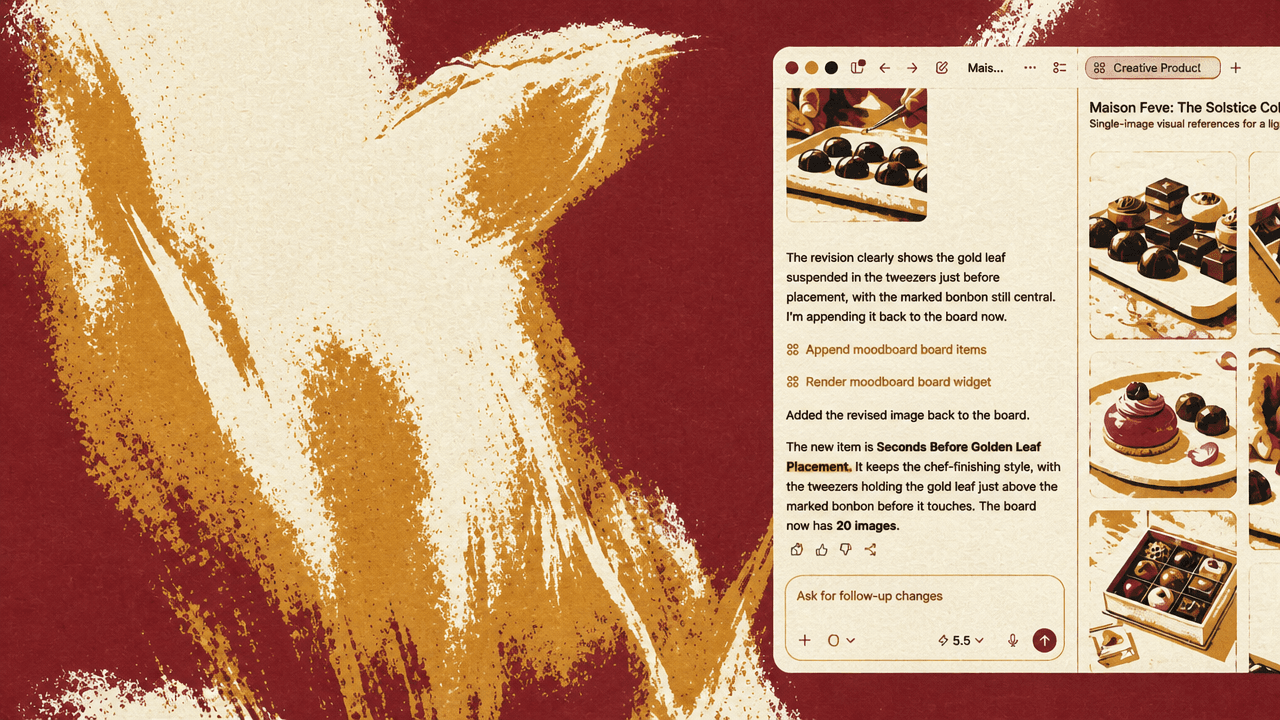
The clearest example of creative control is a revision to a single image. The user opens an image showing a hand placing a gold leaf on a chocolate dome and annotates it with the instruction: “update to the seconds before the golden leaf is placed.”
That instruction is not a new campaign idea. It is a small adjustment to the timing of a shot. The revised result shows tweezers holding the gold leaf above the chocolate before contact. The response says the revision “clearly shows the gold leaf suspended in the tweezers just before placement,” and that it is appended back to the board as “Seconds Before Golden Leaf Placement.”
“We're now not relying on getting the exact perfect image in that shoot.”
The production argument is that the marketer can localize a change: same chef-finishing style, same marked bonbon, but a different instant in the action.
The remix step applies the same idea to style. The user views an image of chocolates on a tray, selects “Remix,” and chooses a “Dramatic Counter” treatment. The options distinguish between different forms of variation: “Editorial Counter” promises cleaner lighting, lighter hierarchy, and a more premium campaign feel; “Documentary Counter” offers more candid texture, natural light, and believable lived-in detail; “Dramatic Counter” uses “richer blacks, sharper highlights, and more cinematic emphasis.”
The selected remix preserves the underlying scene. The response says it keeps “the retail counter and product-led collection cues,” while adding “stronger shadow and counter reflection.” It describes the treatment as maintaining the retail-partner cue — “limited premium collection, ivory display tray, cacao-counter, and gold tongs” — while shifting the lighting and editorial tone.
Selected concepts become display-ad assets
Once the user has preferred images, the work shifts from visual exploration to asset production. The user selects four images from the grid and asks: “Create a set of display ads for the Grand opening on June 2nd, using the revised hero images as our main visual.”
The system creates separate image-generation display ads and adds six individual ad tiles to the board rather than a combined concept sheet.
The generated sizes are 300x250, 336x280, 728x90, 970x250, 300x600, and 160x600. The ad copy reads “MAISON FEVE,” “Grand Opening,” “June 2,” and “The Solstice Collection.”
One spoken line refers to “brochures,” but the prompt and output in this part of the workflow show display ads. The capability being presented is the conversion of selected image directions into launch materials.
The Canva handoff is editable production, not a flat export
The final step is the handoff. The user opens one of the generated display ads and selects “Open In,” with options including “Folder,” “Canva,” and “Figma.” In the shown path, Codex is connected to Canva.
The returned message says the user can open an “editable Canva project,” with a view-only link also available. It states that the project uses the selected display ad from the Solstice Collection mood board as the starting image and preserves the campaign’s “premium visual system”: ivory and cacao tones, soft gold accents, restrained typography, product-led chocolate photography, and the Grand Opening message for June 2.
The same message says that inside Canva, the user should be able to continue from the design with Magic Loop or manual edits, including expanding it into a visual strip, adapting it for additional display sizes, adjusting typography, or building a broader launch asset set from the same Maison Feve campaign direction.
The Canva editor then opens with the generated ad as a working design. The user edits the text from “June 2” to “Today!!” and adjusts the placement of the chocolate image. The closing claim is that the output is “more than just an image.” It is “an actual editable file with multiple different components,” so the marketer can keep adjusting the look and feel after generation.