ChatGPT Adds In-PowerPoint Drafting and Editing for Business Decks
OpenAI presents ChatGPT for PowerPoint as an embedded drafting and editing layer for business presentations, now available in beta to all customers. The source argues that the tool is meant to turn scattered company material — notes, account context, market research, prior deck fragments and analysis files — into a structured executive deck inside PowerPoint, with the user reviewing the storyline before generation and refining slide content afterward. Its claim is less that ChatGPT can make slides from a prompt than that it can keep the source material, outline, draft and edits in one workflow.
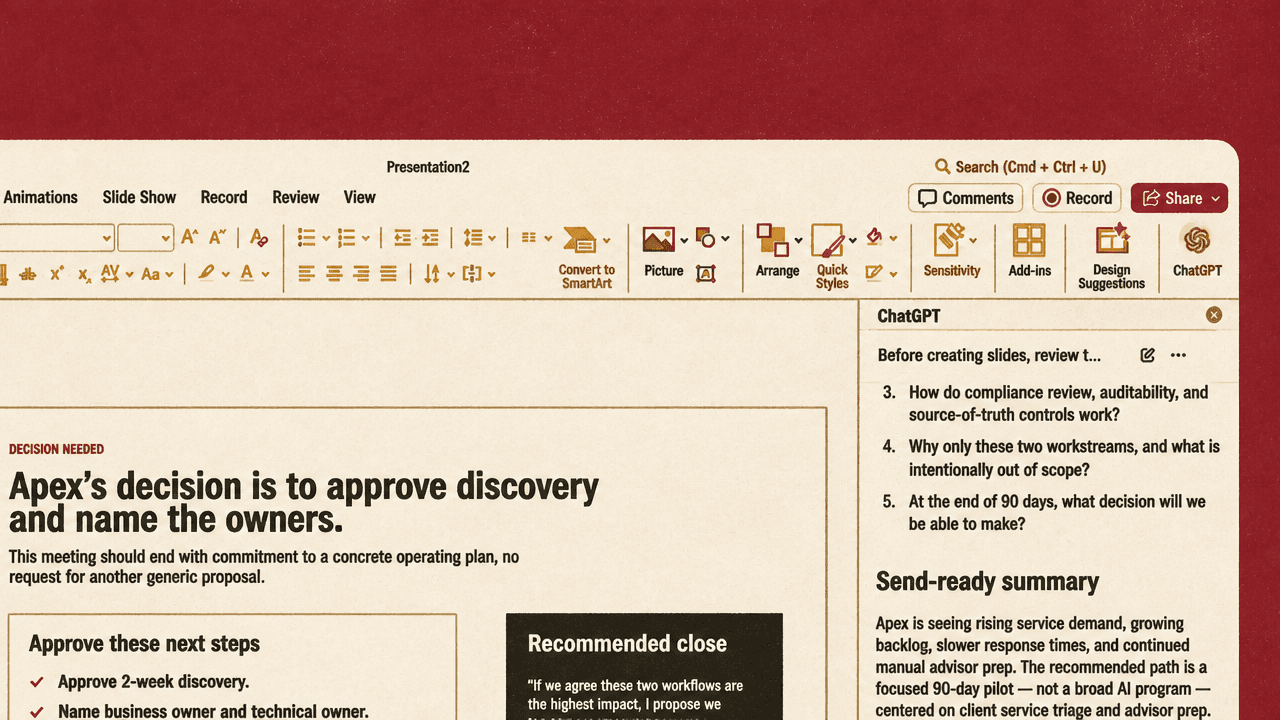
The product claim is an embedded drafting layer, not a slide generator
ChatGPT for PowerPoint is presented as a way to build and edit a business presentation without leaving PowerPoint. The workflow starts with a blank deck and a ChatGPT side panel, but the task is broader than producing slides from a prompt. The user can organize the work, bring in company context, ask for a storyline, generate the deck, and then revise the slide content in place.
The opening screen sets the intended use cases: “Build a sales pitch starter deck,” “Create an objection-handling messaging deck,” and “Draft a one-page discovery call outline.” The example that follows is an executive customer briefing built from existing account material, not a generic presentation assembled from a few instructions.
The central claim is that the add-in turns scattered company context into a structured presentation workflow. Instead of asking the user to manually translate notes, account background, prior materials, and analysis into a deck, ChatGPT acts as the intermediate layer: ingesting context, proposing a storyline, building the presentation, and editing the resulting slides.
The deck is grounded in source material before it has a storyline
ChatGPT can draw on connected apps and local files. The speaker says the user can bring in context from Google Drive, Microsoft 365, internal communication channels, and files uploaded from the local computer.
In the example, the uploaded materials include meeting notes, account context, market research, prior deck fragments, a QBR analysis CSV, and an email thread. The file names shown on screen make clear what kind of material the workflow is designed around:
01-meeting-notes.md02-account-context.md03-market-research.md04-prior-deck-fragments.md05-qbr-analysis.csv06-email-thread.md
The speaker describes these as “messy meeting notes, account context, and other source material” brought into one conversation. That framing matters: the workflow is not just about producing more polished slides. It is about consolidating fragmented inputs into a presentation structure.
After receiving the files, ChatGPT recommends a storyline. The visible recommendation is specific to Apex: the deck should not be a broad “AI transformation” pitch. The executive case should be that service demand is up, Apex’s pipeline is slowing, current solutions are moving in the wrong direction, and Apex should approve a 90-day pilot.
Apex does not need a broad “AI transformation” pitch; the executive case is that service demand is up, Apex pipeline is slowing, current solutions are moving the wrong way, and Apex should approve a 90-day pilot.
That storyline shows the intended level of abstraction. ChatGPT is not only arranging sections; it is selecting a strategic frame for the deck and turning the inputs into an argument aimed at an executive buyer.
The user reviews the argument before slide generation
Before generating slides, ChatGPT gives the user an outline to inspect. The speaker says ChatGPT breaks the presentation down slide by slide, including suggested bullets, tables, formatting, and overall flow. The review point comes before generation: the user can check whether the proposed argument is directionally right before asking ChatGPT to build the deck.
The next instruction raises the quality bar. The user prompt shown in the ChatGPT panel asks ChatGPT to create the deck from the storyline, keep it concise, make it client-ready, tailor it for a COO/CFO audience, add speaker notes, make the next step explicit, and use a skill called “Executive Readiness Quality Pass” to ensure it is “C-level ready.”
The “Executive Readiness Quality Pass” is described as applying a quality bar, formatting standards, and a consistent communication style across the presentation. Its role in the workflow is to make the deck generation step include a review pass, not merely slide population.
The generated deck shown on screen is an “Apex Financial Services | Executive Briefing.” Its main recommendation is to “Approve a focused 90-day pilot, not another broad AI discussion.” The slide argues that the strongest path is to prove operational impact in two high-friction workflows before Q3 renewal decisions. It recommends a two-week discovery phase followed by a controlled 90-day pilot focused on client service triage and advisor prep, with approved sources, review gates, and auditability embedded from the start.
The output modeled here is a recommendation-led executive deck, not a broad explanatory presentation. The generated slide has a clear decision ask, a constrained scope, and implementation guardrails.
The first draft remains editable inside the deck
The first generated deck is treated as a starting point, not the final version. On review, the speaker identifies areas to improve: some positioning language needs work, and “meta commentary” has made its way into the deck.
The user then asks ChatGPT, still inside PowerPoint, to refine the existing slides. The prompt shown on screen is specific: some slides contain speaker-facing meta-commentary, so ChatGPT should either remove or rephrase that positioning, or move it into speaker notes. The user also asks it to remove internal-facing scorecards from the visuals if they are not required.
This is the practical distinction in the workflow. The value proposition is not only draft creation, but iterative editing against the actual deck. The speaker says the changes happen “right in line to the existing deck,” modifying slide content directly. The user does not have to copy suggested revisions from a chat window into PowerPoint manually.
The sequence keeps the user in the review loop at both major decision points: before the deck is generated, when the storyline can still be corrected, and after generation, when the slide content can be tightened in place.
The efficiency claim depends on keeping the workflow in PowerPoint
The final claim is that ChatGPT for PowerPoint turns a slow, manual process into a guided workflow from raw inputs to a high-quality deliverable. The stages shown are: gather source material, generate a storyline, review the outline, build the deck, apply an executive quality pass, and revise the actual slide content in place.
The example is enterprise-facing. It uses account notes, market research, prior slide fragments, QBR analysis, and an email thread to create a customer briefing for a COO/CFO audience. The deck’s recommendation is specific, commercial, and time-bound: approve a focused 90-day pilot rather than continue a broad AI discussion.
The practical claim is narrower and more concrete than “AI makes presentations.” ChatGPT is presented as a drafting and editing layer for business presentations that depend on scattered internal context. The workflow is most useful where the hard part is not drawing a slide, but converting messy source material into an executive-ready argument without moving between tools.
OpenAI’s source description adds that ChatGPT for PowerPoint is available in beta to all customers.