AI-Generated Video Enters the Editable Project Timeline
ElevenLabs is positioning Studio 4.0 as an agentic video-editing workspace where generated video, images, voice, music and sound effects remain editable within the same project. The company argues that users can generate and revise shots by prompt, then work with them on a conventional timeline through frame-level controls, captions, comments and dubbing. Its Studio Agent is presented as a co-editor that can create a first draft or carry out tasks such as captioning, while leaving the editor in control of the project.
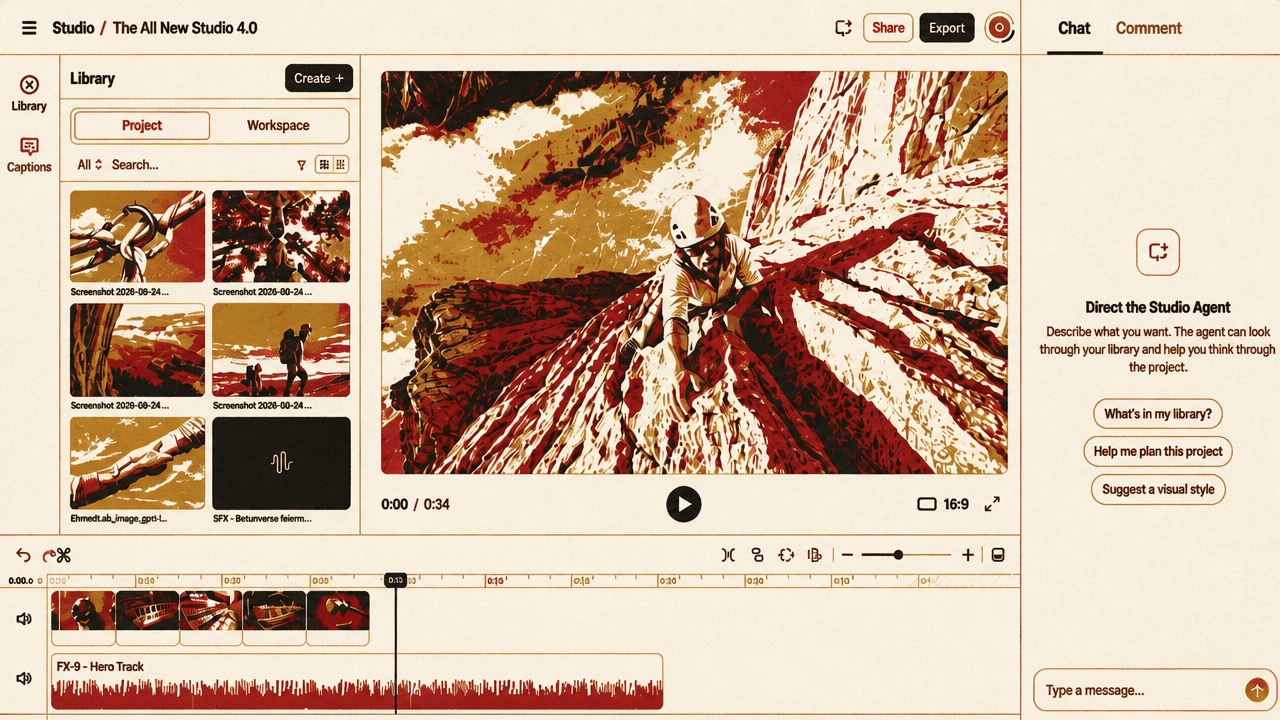
ElevenLabs is positioning Studio 4.0 as one project environment, not a chain of hand-offs
Studio 4.0 is presented as a workspace intended to keep video creation, revision, audio work, review, and multilingual adaptation inside a single project. The proposition is not merely that it can generate a clip from a prompt. It is that the generated clip can remain editable material alongside voice, music, sound effects, text, captions, comments, and dubbing.
The mountain-climber project makes that proposition concrete. A user can request a scene—“Make our character climb up the side of a mountain”—from a generation panel with controls for inputs, start and end frames, image references, aspect ratio, resolution, duration, and generation. The settings visible in the example are 16:9, 720p, and four seconds.
But the initial generation is treated as a starting point rather than a finished asset. A separate prompt asks to “Change the outfit of the climber,” showing that a visual can be revised through a written instruction after the shot has been made. The project can then incorporate a supporting voice, music to set its mood, and ambient sound effects; the displayed audio prompt asks to add ambient sounds to the mountain scene and labels the result “Mountain Atmosphere SFX.”
“Describe the scene you want. Then, generate.”
That is the entry point. Studio 4.0’s broader claim rests on what follows it: generation, editing, and finishing work are presented as parts of the same project rather than as separate stages requiring separate tools.
The generated shot is positioned as timeline material, not a fixed result
Studio 4.0 pairs prompt-led changes with conventional editing controls. It promises control “down to the frame,” and the supplied product description identifies frame-level zoom, clip snapping, and clips that stay synchronized as they are moved on the timeline.
One shown timeline view places a mountain scene beneath the large yellow title “TROOX OUTDOOR SUMMIT.” The title’s displayed controls include opacity, entrance animation, entrance duration, exit animation, and exit duration. In the configuration shown, opacity is 70%; the text enters with a “Gentle float” lasting one second, and has no exit animation.
The source description also treats captions as timeline elements rather than a locked output. Caption cues can be edited like other clips: an editor can split a cue, merge two cues, or correct a mistranscribed word. That detail matters because it places generated and automated work inside an editing surface designed for adjustment.
The product is therefore not framed as requiring every change to be made through prompts. The demonstrated workspace combines prompt-based asset creation and revision with direct controls over text presentation, timing, captions, and clip placement. The initial four-second output is positioned as footage that can be worked on within the project.
Studio Agent is shown performing project work alongside the timeline
Studio Agent is positioned as an AI co-editor for fast iterations. In the demonstrated interface, it occupies a chat pane next to the video-editing workspace. The request is specific: “Create captions in Spanish for the entire video.” The interface reports that it “Thought briefly” and “Activated workflow.”
The source description gives the agent a broader starting role as well: it says Studio Agent can build a first draft from a prompt, after which the user can take over and hand control back. The video itself demonstrates the agent on a captioning task, while nearby interface examples show controls for generating a shot, changing a visual detail, adding sound, and styling text.
This presentation makes the division of work concrete without claiming that the agent replaces the editor. The agent is shown receiving a natural-language instruction inside the workspace; the project beside it visibly contains the timeline and editorial controls through which video elements are being arranged and treated.
Collaboration and dubbing extend the same project beyond a single editor
The workspace is framed for teams as well as individual editors. A visible comment on a shot of a climber falling backward proposes an additional scene in which someone catches him. The comment does not establish a broader review process, but it does show feedback attached to a particular creative change within the project.
Language adaptation is presented with similarly direct evidence. The claim that teams can scale to new audiences is delivered in English, Spanish—“A nuevas audiencias en todo el mundo”—and French—“Partout dans le monde.” Alongside it, a dubbing menu displays English, Spanish, French, and Mongolian as language options.
The source does not present generation as the end of production. Its sequence is instead a connected set of capabilities: describe a shot, generate it, alter its details, add voice and sound, control timing and presentation, create or edit captions, collect feedback, and select languages for dubbing. Studio 4.0 is being positioned around that continuity of work.