Studio 4.0 Keeps AI-Generated Video Editable on the Timeline
ElevenLabs presents Studio 4.0 as an agentic video editor built around an editable project timeline rather than one-off media prompts. The company says users can generate video, images, voiceovers, music and sound effects within the same workspace, then revise shots, captions and audio alongside the rest of the edit. Its Studio Agent can assemble a first draft or handle tasks such as captioning, while leaving editors able to alter the work and hand it back to the agent.
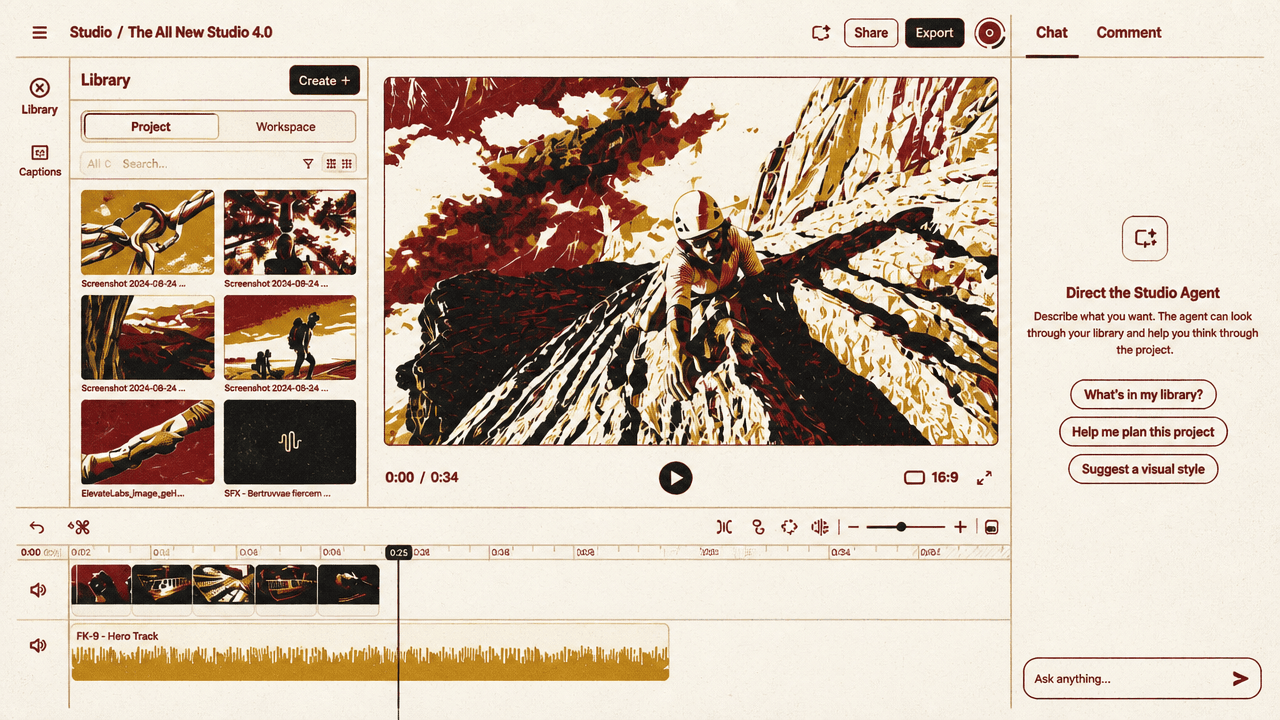
The project timeline, not the prompt, is the product
ElevenLabs positions Studio 4.0 around an editable project rather than a one-off generation prompt. Its proposition is that video, voice, music, sound effects, images, captions, collaboration, and export can occupy the same workspace—and remain available for revision as the project develops.†
The interface makes that proposition concrete. A library, video player, timeline, and Studio Agent chat occupy the same editing view. Rather than presenting generated media as an isolated output, the workspace places it beside the controls needed to assemble and revise a project. The agent panel says it can build from the library and help plan a project or suggest a visual style, placing it upstream of a narrowly defined generation request.
Every tool you need in one place, so you can always stay in focus.
That framing shifts the unit of work from an individual generated asset to the project as a whole. A shot, voiceover, title, music cue, caption, and comment are presented as elements of one editable composition rather than outputs passed between separate tools.
Generated media remains subject to editorial control
Studio 4.0 presents generation as material that can be revised inside the edit. A video-generation prompt asks the system to make a character climb up the side of a mountain, with controls for aspect ratio, resolution, and duration. The displayed configuration is 16:9, 720p, and four seconds.
The next visible request is more specific: change the climber’s outfit. That edit includes start- and end-frame fields, a reference input, and an automatic option. ElevenLabs’ sequence—“Describe the scene you want, then generate,” followed by “Refine every detail, until it’s exactly right”—casts a generated shot as something to alter in place, not merely accept or discard.
The same distinction carries through the rest of the edit. A voice can be added after the shot is generated; music and ambient sound are prompted against the climbing footage; and text is adjusted over the video within timeline controls. The source’s claim of control “down to the frame” is therefore not just a statement about generation settings. It is tied to a continuing timeline where picture, narration, sound, and titles can be shaped together.
The agent can draft work without replacing the editor
Studio Agent is presented as an in-project co-editor rather than a separate system that produces a detached final result. The demonstrated request—“Create captions for the entire video”—activates a workflow from the chat panel. ElevenLabs also describes a broader handoff model in which the agent builds a first draft from a prompt, the user takes over, and control can be handed back for further work.
For a production team, the intended division of labour is clear: the agent can accelerate repeatable or expansive project tasks, while human editors retain the ability to revise the resulting material in the same project. Captions are one example; the product description says they can be handled as timeline clips, including splitting or merging cues and correcting a mistranscribed word. The source does not portray automation as a substitute for editorial judgment. It portrays it as a way to get a working draft into an editable environment faster.
Collaboration is attached to that same project view. A comment from Jeniffer appears over the player and timeline: “Let’s add an extra scene where someone catches him from f”—truncated on screen. The placement matters more than the incomplete comment: feedback sits beside the sequence being discussed, rather than being detached into another review process.
Localisation is also shown as part of the project workflow. A “Dub to English” control appears beside footage of two climbers taking a selfie, followed by Spanish and French lines about reaching audiences around the world. Studio 4.0’s implied workflow is therefore not simply generation followed by export. It is a shared project in which a team can develop a draft, revise assets, collect feedback, create captions, and adapt a finished sequence for other languages.