Agent Interfaces Are Moving From Chat to Web-Native Surfaces

Rachel Nabors argues that chat should be treated as a transitional interface for agents, not their final form. Using her rebuilt Rachel the Great web comic archive as the example, she shows how MCP apps can render HTML, CSS and JavaScript inside Claude as a working comic reader, while WebMCP can expose a site’s existing functions directly to browser agents. Her case is that the web platform already provides the “infinite canvas” for agent software; the task is to let agents inherit it rather than confining them to text conversations.
Agent UX should inherit the browser, not remain trapped in chat
Rachel Nabors treats chat as an early, developer-friendly phase of agent software: useful because it is universal, but limited as an interaction model. Her analogy is the command line. Developers may love the CLI, and her own mother once insisted that games should be launched through DOS commands rather than icons, but everyday interfaces moved elsewhere. On an iPhone, people tap, point, and use visible affordances rather than type commands.


Chat is the lowest common denominator of the user experience.
A blank chat box makes the user do too much discovery. Nabors calls this “Starfish design”: the interface sits there and waits for the user to know what to ask for. It works tolerably well when the user already understands the domain. If someone lands in Linear, they may already know they are in a ticketing system and can ask for the issue, project, or workflow they want. As a general pattern, a conversational surface with no visual cues asks the user to carry the product model in their head.
Her implementation is built around her old web comic archive, Rachel the Great. Before her work at Mozilla, the W3C, Microsoft Edge, React, React Native, and Arize, Nabors made web comics for teenage girls on the iVillage network. She says the site once had 400,000 weekly readers, and that she still receives fan mail from women who grew up with the comics.
The archive she built around 2010 had started to accumulate 404s, broken images, and CDN problems. Rather than merely repair it, she wanted to make it available across the surfaces where readers and agents now operate.
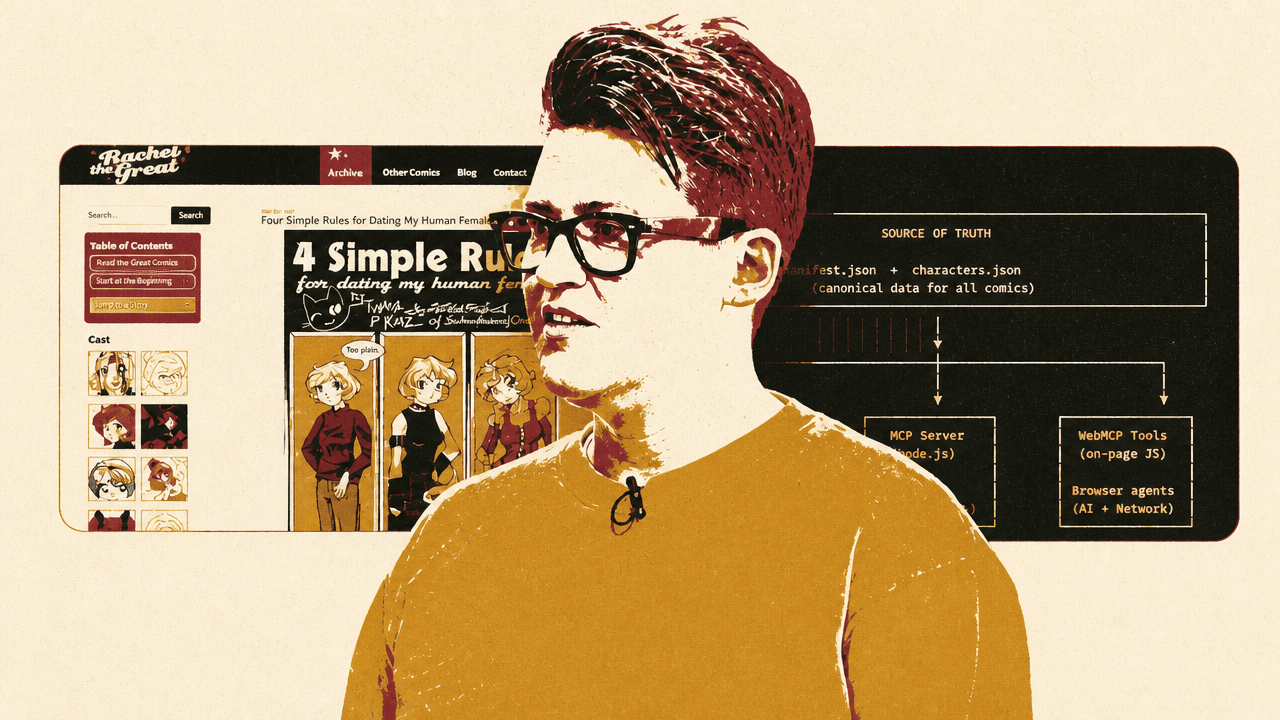
The architecture she shows has one canonical source of truth, a manifest.json plus characters.json, feeding three surfaces: a static site built with 11ty for human readers in a browser, a Node.js MCP server for AI agents such as Claude, and WebMCP tools implemented in on-page JavaScript for browser agents. The slide labels the pattern “3 surfaces, one manifest.json source of truth.” Its design goal is not to put a chatbot on the site. It is to let the same archive data support three specific clients without treating chat as the only destination.
| Surface | Client | Role |
|---|---|---|
| Static site | Human readers via browser | The conventional website built from the canonical comic data. |
| MCP server | AI agents such as Claude | A remote tool surface for listing, searching, and retrieving comic content inside an agent. |
| WebMCP tools | Browser agents | On-page JavaScript capabilities exposed directly to agents using the browser. |
Nabors’ underlying claim is that the web platform already has the primitives needed for richer agent interfaces. She has long treated the browser as “an infinite canvas” rather than a document reader: something that can render documents, animation, audio, video, canvas, and whatever an application needs. Her argument extends that view into agent environments. If agents can render web primitives, then agent software does not need to remain trapped in conversational walls of text.
Remote MCP over HTTP makes agent tools installable like web services
The first practical layer in Nabors’ implementation is a remote MCP server hosted on the web. She distinguishes two MCP transports: standard input/output, which she jokingly renames “studio,” and HTTP.
With STDIO, the server runs as a local process spawned by the client. Communication happens through stdin and stdout, and the server stays alive for the session. That is why configuring a local MCP server often involves editing a JSON config file with command-line strings. Nabors’ point is not that this is wrong for developers; it is that it is a poor default for normal users.
HTTP changes the installation shape. The server runs as a web service, listens at an HTTP endpoint, communicates through HTTP POST requests, and works well with serverless setups. Nabors explicitly leaves security and privacy concerns outside scope, but she emphasizes the user-experience difference: in Claude, a remote MCP connector can be added by giving it a name and a URL, such as https://rachelthegreat.com/mcp, rather than asking the user to configure a local process.
Her comic archive exposes tools that mirror the site’s navigation and search functions:
| Tool | Purpose in the comic archive |
|---|---|
| list_comics | Return the available comic collections. |
| list_storylines | Return story arcs within comics. |
| list_characters | Return characters in the archive. |
| search_comics | Search comics, using transcript text. |
| search_by_character | Find comics by character. |
| get_transcript | Return a Markdown transcript rather than JSON. |
Most of those tools return structured JSON. The exception is get_transcript, which returns Markdown. That distinction becomes important later, because Nabors wants both machine-readable navigation and human-readable comic content.
In the plain tool-only experience, Claude can call the archive and produce a list of comics. Nabors uses that to make a point about the limits of chat: it works, but it is wordy. The assistant can announce that it is searching, explain what it found, and list results, but the experience is still a conversation about a comic archive rather than a comic reader. The next layer turns the tool response into an interface.
Resources are for durable context; tools are for action
Rachel Nabors wants full transcripts and commentary available for meta-analysis of themes, character arcs, and other archive-wide questions. In her view, that is exactly what MCP resources should be for. Rather than asking Claude to call get_transcript across hundreds of comics, the server could expose transcript indexes, storyline transcripts, commentary indexes, and storyline commentary as resources.
The URI examples she shows are concrete: transcript://rtg-comics/index for a transcript index, transcript://{comic-id}/{storyline-id} for storyline transcripts, commentary://rtg-comics/index for a commentary index, and commentary://{comic-id}/{storyline-id} for storyline commentary. Those resources would represent durable context available to the harness, not ad hoc actions the model has to discover and invoke one at a time.
Her frustration is that resources are “loosely defined” and “loosely implemented,” and she cannot find a client where those resources are actually visible in the UI. The resources exist on the server, but they are not usable in the agent harnesses she has tried. She asks client builders to implement even barebones resource support.
The reason is not cosmetic. Nabors argues that agents do not like using MCP tools to add Markdown documentation into their own context. She applies the same critique to documentation sites that assume adding MCP tools will solve the problem of coding agents understanding their docs. In her phrasing, the agent would “rather die in a fire” than go call documentation through MCP tools.
The better model, as she describes it, is that resources let the harness decide when to pre-prime context. If a user switches into a React-oriented mode, for example, the harness could fetch the React resources from a React MCP server without making the model parse tool descriptions and choose tool calls for documentation ingestion. A slide in the talk quotes Kevin Swiber’s framing of MCP resources as “the forgotten primitive,” including the question: “If the user knows they want to include project documentation before asking a question, why should that documentation's availability be described in a tool manifest? Why burn tokens on a tool description the model has to parse and reason about?”
This distinction is central to Nabors’ design: tools are for actions and structured calls; resources are the better conceptual fit for durable context such as documentation, transcripts, and commentary. The ecosystem has not yet made resources accessible enough.
An MCP app turns a tool response into a real comic reader
Rachel Nabors uses an MCP app as the central proof point: an inline, in-agent rich media experience created by bundling HTML, CSS, and JavaScript into a single file. She notes the resemblance to earlier web patterns such as DHTML, but the use case is concrete: a comic reader rendered inside Claude.
The tool is called get_page. It accepts identifiers for the comic, storyline, and page number; Nabors notes that it probably only needs the storyline ID and page number and says she plans to refactor it. The important part is the tool metadata. The registration includes a _meta object with a ui.resourceUri, pointing to a UI resource such as ui://rtg-comics/reader.html. That tells the client that the tool response has an associated app surface.
When she asks Claude to read “Crow Princess,” Claude finds the comic in the archive and calls get_page. Instead of returning only text, the interface displays an embedded comic reader inside the chat conversation. The visible frame shows “Rachel the Great,” “Crow Princess, Page 3,” a panel description, and a “Read inside Claude” label. Nabors then demonstrates that the reader can show commentary and comments, navigate forward and backward, and switch into text mode. In text mode, the same page reveals the transcript, so the comic can be read as structured text as well as viewed as images. Nabors stresses that it looks and behaves like the website because it is using resources from the website.
The demonstrated Claude reader is load-bearing evidence for her critique of chat: the agent is still involved in finding and opening the right content, but the reading experience is not reduced to assistant prose. It becomes a small website inside the agent, with panels, navigation, comments, commentary, and transcript mode.
There are constraints. Nabors says every MCP app is an island. It is a single HTML file, so required assets must be embedded, for example as base64, or explicitly linked with the right content security permissions. The app runs in a sandboxed iframe. There is no localStorage, so state cannot simply be tracked across iframes. Network access is not available in the ordinary way; the app must ask the server to do things for it through tool calls. Links also require host permission. Instead of window.open() or a normal link opening freely, the app must ask the host through an API such as appRef.current.openLink({ url }).
| Constraint | Implication |
|---|---|
| Single HTML file | Assets must be embedded or explicitly linked with the right policy. |
| Sandboxed iframe | `localStorage` is unavailable for carrying state across iframes. |
| No ordinary network access | The app has to ask the server to do things through tool calls. |
| Host-mediated links | Opening external URLs requires permission through the host API. |
| External resources blocked by default | Fonts, images, and similar dependencies must be allowed in the CSP. |
External resources require explicit configuration. Fonts, images, avatar services, and similar dependencies are blocked unless added to the content security policy. If an app renders blank or loses expected styling, Nabors’ debugging advice is to check the CSP.
MCP apps can also call tools, which enables things like next-page and previous-page navigation. But she warns that UI-only tools should be hidden from the model. Some tools are meant for the embedded app, not for the agent to call and narrate as JSON. In her example, _meta.ui.visibility can be set to ["app"] so the tool is visible to the app but not to the model.
Her implementation advice is to build MCP apps with the same design system as the source site. In her case, the MCP app shares fonts, CSS, and assets from the same server, with the necessary permissions in place, and bundles the HTML and JavaScript components using Vite single-file. Agent interfaces can inherit the craft and consistency of existing web interfaces rather than starting over as chat transcripts.
WebMCP exposes page capabilities directly to browser agents
The other direction is WebMCP: instead of bringing a website-like app into an agent, expose a website’s existing capabilities so an agent in the browser can use them directly. Rachel Nabors describes current browser agents as still struggling with ordinary websites because they rely on screenshots or DOM traversal. Screenshot-based navigation requires visual models guessing how the interface works. DOM traversal consumes tokens by chewing through HTML or XML-like structure. Both are compute-intensive ways to discover capabilities that the site often already knows how to perform.
WebMCP, as Nabors presents it, makes each HTML page a small tools server for agents using a browser, whether headless or with a viewport. She is careful to say that WebMCP is not the same thing as MCP. It is “to MCP as JavaScript is to Java”: inspired by the naming and direction, but not one-to-one compliant with the MCP spec. The specs may diverge, and the technology is still in active development.
It has two modes. The declarative HTML mode lets developers add toolname and tooldescription attributes to a form. For sites with many forms, such as dashboards, that is a low-friction way to expose form behavior to agents as tools. If the site already has JavaScript or functions processing the form, the attributes tell the browser agent what capability is available.
The imperative JavaScript mode uses navigator.modelContext.registerTool(). Nabors uses this more heavily because comics are not mostly forms except for search. In the example she shows, the page checks whether modelContext exists in navigator, then registers a next_page tool with a name, description, input schema, and execution callback. The callback looks for link[rel="next"]; if it exists, it sets window.location.href to that URL and returns { navigated: true, url: nextLink.href }. If not, it returns { navigated: false, reason: "No next page" }.
A browser agent does not need to inspect screenshots or traverse the DOM to infer which element advances the comic. The page can expose “next page” as a named capability with a schema and an execution function.
Nabors demonstrates this using the MCP B extension, which she describes as a debugging extension. In the browser, the comic page appears on the left and the exposed tools and a chat-like testing panel appear on the right. The visible tester includes prompts such as “Read this to me” and “Go to the next page.” She asks it to read the page, and it returns the transcript. She then asks it to go to the next page, and the model calls the page’s registered function. The browser navigates forward without the agent needing to click around.
She points viewers to an interview she did with the creator of WebMCP, who, according to Nabors, began the work at Amazon to get around authentication issues. She also notes that there is a standards community group and that support is not complete. The implementation is presented as something to experiment with, not a settled platform guarantee.
The web platform remains the substrate
Rachel Nabors says she began her work on the agentic web two years earlier with a provocation about “the death of the browser.” Her clarification now is that the web is not dead; it is changing. HTML, CSS, JavaScript, and HTTP remain “alive and well” inside agents. CSS and JavaScript are not only languages of websites; in her framing, they are becoming languages of interactive agent experiences.
She reinforces that point through a transcript-and-speech demo. In the browser version of the comic, she shows a transcript view for a comic page and has it read aloud. The voice is not an external AI voice service. It is the Web Speech API: window.speechSynthesis as the controller, SpeechSynthesisUtterance to create speech from text, speechSynthesis.speak() to play it, and speechSynthesis.cancel() to stop it. Nabors says it sounds terrible and that someone could do something better with a service like ElevenLabs, but her point is that the browser already has a zero-dependency text-to-speech capability with no inference required.
She places Web Speech alongside Web Animations, Audio, Canvas, WASM, CSS, and other existing browser APIs. The argument is not that every agent interface should be a miniature website for its own sake. It is that the web’s primitives already support richer interaction than chat, and those primitives can be carried into agents through MCP apps and exposed to browser agents through WebMCP.