Agent Skills Turn Repeated Instructions Into Portable Workflows


WorkOS engineers Nick Nisi and Zack Proser make the case that AI “skills” are a practical way to turn repeated agent instructions into portable, reusable workflows. They argue that small markdown-and-script packages can encode team context, constraints, evidence-gathering commands and output formats so agents stop producing generic answers and start following a team’s way of working. Their warning is that skills only help when they are focused, routed correctly, tested against a no-skill baseline and managed like shared software rather than treated as another giant context file.
Skills are a way to stop re-explaining your work
Nick Nisi and Zack Proser framed skills as a response to a basic failure mode in day-to-day agent use: every AI conversation starts from zero. The model does not automatically know that a repo uses pnpm rather than npm, that tests are co-located, that a particular auth module is off-limits, or that README files follow a specific internal format. If that context is not supplied, the model either guesses or returns generic advice.




Proser’s example was a repo health check. Without a skill, a generic prompt like “look at this repository and tell me how it’s doing” tends to produce generic output: add more tests, improve documentation, and similar advice with no evidence. With a skill, the same request can be routed through a small markdown file that encodes the team’s conventions, constraints, and evidence-gathering scripts. The output can move from “looks pretty good overall” to a scored report with specific files, stale TODOs, README drift, churn hotspots, or bus-factor risks.
Yeah, it doesn't know what you know. So you have to be very specific and be thorough with what you want it to know, because it's not always going to figure it out.
Nisi and Proser both acknowledged that teams already do a version of this with files such as CLAUDE.md, AGENTS.md, or .cursorrules. Those files work: they give the agent persistent project instructions instead of forcing a human to repeat them in every session. But they also have limits. They are often tied to a single repo, or they become global instructions that affect every task. They can grow into kitchen-sink files, and they do not naturally compose into small reusable units. They also do not provide a built-in pattern for deterministic script execution.
Skills, in their framing, are the next step: portable across projects, executable through scripts, and composable as small focused units. A skill should encode a discrete unit of work, not the entire organizational brain. Proser compared the pattern to carrying the DRY principle into the agentic era: explain the work once, then reuse that explanation across agents, repos, and teammates.
The important distinction is not that a skill is magic. It is that it gives the model a repeatable route for doing a task in the way a person or team expects. Nisi said that if the desired output is a specific report in a specific structure, a skill is how the team teaches the LLM to do that task consistently.
A useful skill starts with routing, constraints, and evidence
Zack Proser described a basic skill as a SKILL.md file with frontmatter, context, scripts, constraints, and output structure. The frontmatter includes a name and a description. The description is especially important because it is how the LLM decides whether the skill applies to the current user request.
Nick Nisi emphasized that a skill is not necessarily just one markdown file. It can be a folder containing SKILL.md plus scripts, reference files, images, or other supporting material. But the description remains the entry point. It is not marketing copy for humans; it is a routing rule for the model.
A sample repo-roast skill used a description like this: it analyzes repository health by running git scripts to find stale TODOs, churn hotspots, large files, and documentation gaps; it should be used for repo assessments, health checks, or tech debt audits; it should not be used for simple file lookups, git history questions, or code review of specific changes. Nisi suggested a practical test: ask the AI tool, “When would you use this skill?” If the answer does not match the author’s intent, rewrite the description.
The workshop repository was shown as https://github.com/workos/aie-europe-skills-at-scale.git, with attendees instructed to clone it, run ./setup.sh, and start by asking the agent to roast the repo. The point was not the domain itself. Repo Roast was a shared exercise for learning the patterns: routing, constraints, scripts, phases, confidence, and tone.
The slide anatomy made the pattern concrete:
---
name: repo-roast
description: Analyzes repository health using git scripts. Use for repo audits.
---

## Context
Stale TODOs: `grep -rn 'TODO' | head -20`
Hotspots: `git log --name-only | sort | uniq -c`
Largest files: `git ls-files | xargs wc -l`

## Constraints
- Never be vague — cite specific files
- Every finding needs evidence + severity
- Never recommend "rewrite from scratch"
- Maximum 10 findings, ordered by severity

## Structure
1. One-line health verdict (score /10)
2. Top 3 worst findings, evidence, severity, fix
3. One thing the repo does well
The second design principle was constraint over prescription. Proser said a common failure mode is writing a long, novel-like markdown file that tries to prescribe every step. A better pattern is to close off failure modes. For a repo audit, useful constraints include “never be vague,” “cite files and counts,” “only report findings backed by evidence,” “never recommend rewriting from scratch,” and “maximum 10 findings, ordered by severity.” The slide summarized the reason bluntly: every unconstrained dimension is where the AI drifts.
The third principle was evidence. Nisi showed Claude’s ! backtick interpolation pattern, where shell commands are executed and their output is injected into the skill’s context. Instead of asking the model to go find the latest commits, the skill can provide the exact command that returns the latest commits in the expected format. Instead of letting the model infer stale TODOs, the skill can run a grep command. Instead of asking it to inspect the repo loosely for large files, the skill can run git ls-files | xargs wc -l and sort the result.
Proser called this an on-ramp for interleaving deterministic results into a nondeterministic LLM conversation. The model still reasons over the result, but it starts from concrete data. Nisi put it more directly: without scripts, the AI speculates about the repo; with scripts, it has git logs, file counts, and grep results.
This also saves tokens. Proser noted that asking an agent to “go figure out the last 10 commits” may work once and then waste time in another terminal tab. Once that piece of workflow is formalized, the skill can say: run this exact script.
The same skill file has different operational surfaces
Nick Nisi said the appeal of skills is partly that they are generally applicable across the major coding agents and AI tools the presenters use. The file may be discovered differently by Claude Code, Codex, and Cursor, but the skill itself remains markdown.
| Tool | Discovery path |
|---|---|
| Claude Code | .claude/skills/repo-roast/SKILL.md |
| Codex | .agents/skills/repo-roast/SKILL.md |
| Cursor | .cursor/rules/repo-roast.md |
The operational implication is that the workflow can be portable even when installation is not. Skills can live inside a repo, where they apply to that project and are available to anyone using it. They can also live in a user’s home directory, where they become generally available. Nisi said tools such as Vercel’s mcp-skills help by symlinking skills into the directories different tools expect.
The development loop is deliberately short: edit the skill, save it, invoke it, inspect the output, and edit again. The slide emphasized that there is no restart or reload step. Nisi treated that loop as the basic method for improving a skill, and pointed to Claude’s skill-builder or skill-creator skill as a way to critique, set up, and evaluate skills.
Zack Proser gave a non-coding example from WorkOS recruiting. He worked with the recruiting team to build a skill that could take candidate information, understand what the team was looking for, pull context from Slack and Notion through Claude Desktop connectors, combine it with recruiting software data, and produce a report. It was not intended as the final artifact for every process. It was a building block. But once the team had the skill, everyone could run the same workflow in a uniform way.
Nisi also explained how skills can be distributed to non-technical teammates. A skill folder can be zipped and renamed from .zip to .skill, then dragged into Claude Desktop. He cautioned that this is not a good versioning mechanism and not a place to put sensitive credentials. But as a practical distribution method for non-coding workflows, it works. Proser added that marketplaces can also be used in Claude Desktop, especially for skills that apply outside coding.
Teams still need a management layer
Zack Proser answered an audience question about what happens when many engineers want shared skills, forked skills, or team-specific variants. WorkOS, he said, had not fully reached the painful version of that problem, but he recognized it as the kind of management layer now emerging around skills. He described it as a “my skill, your skill” human problem.
Nick Nisi said WorkOS has several layers. There is a public WorkOS skills repo installable with commands such as npx skills add. There are internal skills that apply broadly to WorkOS engineers, including examples such as an auth specialist, a DX specialist, and a ghostwriter. Nisi also keeps his own marketplace of personal plugins and skills. Skills specific to WorkOS’s large monorepo often live in that monorepo.
Proser suggested that the plugin system may be the direction this takes. A plugin can be installed similarly to a package, can point to a repo, and can be versioned. If an engineer needs a forked version, the interface could still be standardized. He described the remaining tooling as repo management and packaging: choosing which marketplaces to add, which skills to install, and which version a given team or individual should run.
When asked how to avoid loading every skill for every engineer, Proser treated it as a packaging question. A frontend engineer may not want backend skills installed even if the agent is supposed not to use them. A possible pattern would be onboarding docs that say which marketplaces to add and which skill groups to install for a given team. The backend mechanics, in his framing, look similar to code dependency management.
Nisi also discussed conflicts between skills. If more than one skill could apply, descriptions need to be broad enough to trigger on the right terms but specific enough to avoid accidental routing. The WorkOS public skill description enumerates many topics and acronyms — SSO, SAML, SCIM, RBAC, FGA, MFA, AuthKit, backend SDKs, migrations, and more — so the agent can route WorkOS-related questions to it. If automatic routing is not enough, a user can invoke a skill explicitly by name or through a slash command such as /workos.
The unresolved work is not whether skills can be shared. The presenters showed several ways they already are. The harder problem is governance: deciding what belongs in a repo skill, a global skill, a team marketplace, a personal fork, or a productized plugin.
Progressive disclosure keeps skills from becoming another giant context file
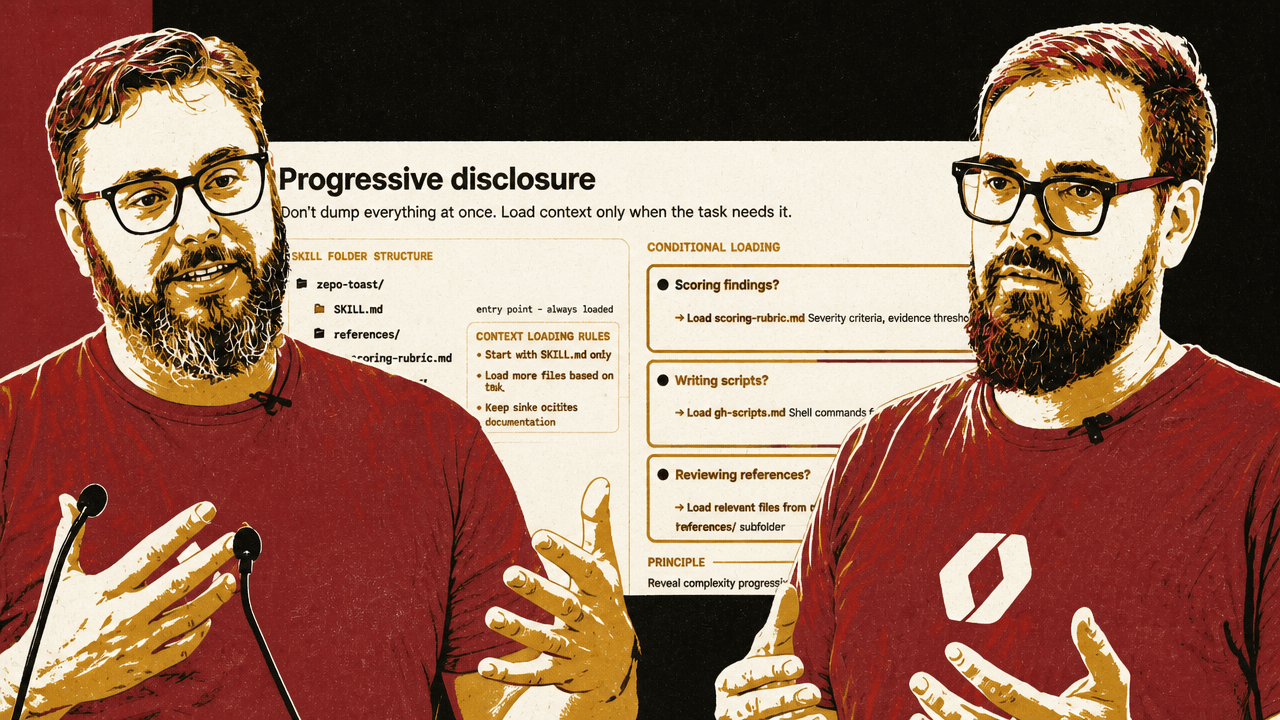
Zack Proser and Nick Nisi moved from basic skills to making them smarter without bloating the context window. The key pattern was progressive disclosure: do not dump everything at once; load context only when the task needs it.
For the repo-roast example, SKILL.md can be the always-loaded entry point. Supporting files can live under references/: a scoring rubric, git scripts, recommendation templates, audience guides, and other material. The skill can tell the model to load the scoring rubric only when it is scoring findings, load git scripts only when gathering evidence, and load recommendation templates only when writing recommendations.
| Task condition | Reference to load | What it supplies |
|---|---|---|
| Scoring findings | references/scoring-rubric.md | Severity criteria and evidence thresholds |
| Gathering evidence | references/git-scripts.md | Shell commands for repo analysis |
| Writing recommendations | references/recommendation-templates.md | Output format and prioritization rules |
Nisi said this pattern also appears in the WorkOS skills repo. The WorkOS skill is effectively a “skill router.” If the user is installing AuthKit in Next.js, the skill points the model to references/workos-authkit-nextjs.md. If the user is migrating from Auth0, it points to the Auth0 migration guide. If the user is not using Next.js, the Next.js-specific reference does not need to enter the context.
Proser connected this to migration support. WorkOS has guides for moving from providers such as Auth0, Cognito, Firebase, Supabase Auth, Stytch, Clerk, and others. A single migration skill can route to the specific provider reference instead of loading every migration guide into memory.
The same pattern can adapt a skill to different audiences. Near the end, Nisi suggested that the same repo findings could be delivered differently for a developer, an engineering manager, or a new teammate. A developer might get blunt roast mode. An engineering manager might get quantified impact. A new teammate might get orientation mode: welcoming, not alarming. If the audience is unclear, the skill can ask who the output is for.
Nisi also suggested the skill could infer audience signals, such as checking the user’s git email or number of commits in the repo. Someone with 10,000 commits may be safe to roast. Someone with four commits may be a new hire and should not be scared away from the project in week two.
Confidence scoring is a forcing function, not a measurement instrument
Zack Proser described confidence scoring as another way to improve skill behavior. A repo-roast skill can require the model to rate each finding before presenting it: evidence quality, severity accuracy, and actionability, each on a 1–10 scale. If evidence quality is below a threshold, the finding should be dropped or marked as needing investigation.
Nick Nisi and Proser were careful about what this means. They did not present the number as mathematically rigorous. Nisi said the model may be “pulling that number out of nowhere” if asked simply how confident it is. The value comes when the score is tied to a rubric and used to force the model to show its work. When the model has to explain why it is confident, it may realize it is less confident than it first claimed.
Nisi demonstrated the pattern through his ideation skill. He gave Claude a vague request: add a fun slash command, similar to a Claude Code April Fool’s feature, to the WorkOS CLI. The skill did not immediately implement it. It asked what kind of fun he wanted: a personality swap, visual gag, mini-game, fortune output, or something else. After Nisi chose a visual gag and answered follow-up questions, the skill produced a confidence table.
The confidence score reached 90 out of 100, with dimensions such as problem clarity, goal definition, success criteria, scope boundaries, and consistency. The model identified that the remaining gap was the specific kind of ASCII art subjects. After Nisi answered, the score rose to 96 out of 100, and the skill wrote a contract: problem statement, goals, success criteria, scope boundaries, out-of-scope items, future considerations, and execution plan.
The way I would say that is like, is the math airtight? No. Does it matter? No. Because the value is in the iterative loop of like clarifying and clarifying your own thinking by responding.
Nisi compared the value to a good engineer in a whiteboarding session drawing detail out of a stakeholder. The score is useful because it gates execution and forces clarification before work begins.
Evals catch when a skill makes the model worse
Nick Nisi said WorkOS ships evals for public skills. Their framework runs tasks without the skill and then with the skill, grades the results against a rubric, and fails if the skill performs worse. He described tracking whether the skill gets the right answer 80% or 90% of the time, and continuing to check as new models drop.
Zack Proser called that “fuzzy math” but still valuable: once there is a baseline, a team can test against it. Later, Proser compared evals to an Apple Watch. The numbers may not be perfectly accurate, but they give a directional baseline: whether the skill is improving or making things worse.
That distinction mattered in one of Proser’s examples. With a Next.js installer skill, he said evals showed he had made the model worse by being too prescriptive. Claude Code was already good at working with Next.js, and his dogmatic instructions reduced performance. The measurement slide cited a negative measured delta versus no skill at all, while Proser described a large drop in overall accuracy “based on these numbers I made up.” The point was not the exact percentage; it was that a skill can degrade performance if it over-constrains the model.
Proser recommended an iterative loop: build an initial skill, use it for a few days or a week, look honestly at what it produces, and then refine it. Claude conversations are saved locally in JSONL files, so the transcripts of usage can become material for improving the skill. If the agent repeatedly asks the same clarifying question, the skill may need to provide that context up front. If it repeatedly performs ten tool calls to gather the same information, the skill may need a script that condenses those calls into one or two deterministic results.
Nisi said meta-skills can analyze past Claude usage and identify work that could be encapsulated into a skill. Proser’s related intuition was that the best candidates are often the nagging, high-friction tasks that repeatedly interrupt focus.
Skills become more valuable when they leave the editor
Zack Proser and Nick Nisi repeatedly returned to the claim that skills are not just for coding. In their examples, the same pattern applied to recruiting reports, blog writing, image generation, video generation, code review, CI pipelines, and Slack-to-Linear workflow automation.
Proser described his own Slack-to-Linear setup as an example of the kind of coordination loop he wants agents to absorb. He said Claude has Slack and Linear connectors available in his environment. In Claude Code, he said, a loop command can run every 15 minutes. His prompt checks whether there is already a correlative Linear ticket; if not, it creates one. If a ticket exists and the Slack request adds new requirements, it updates the ticket. He also described running another terminal tab that loops over Linear tasks and does work against that state. His point was not that every team should copy the exact setup, but that skills can encode repetitive coordination loops that otherwise interrupt focus.
Proser described the WorkOS CLI installer as a production-scale use case. The CLI can run workos install in a project without auth, or in a project with another auth provider, and the agent-driven workflow figures out what framework the project is using and installs WorkOS AuthKit accordingly. Proser said the CLI uses the Claude Agent SDK under the hood, and that the “brains” are skills in the WorkOS skills directory. In his framing, WorkOS gets two benefits from the same work: build the skill, make it good, and then prove it through the CLI that runs it.
Nisi described blog writing as a high-leverage use case. As a team grows, people may want to write in a consistent way without knowing the CMS, tone, format, or internal conventions. Previously that might have lived in a Notion doc that someone hoped writers would read. A skill can encode voice, style, and workflow constraints so a writer can get most of the way to the artifact without consulting another person.
For image and video generation, the pattern was the same but the scripts changed. Nisi demonstrated a Nano Banana Pro skill that took a prompt, expanded it, and passed it to a TypeScript script that called an image generation API. Proser described an animation skill that took a user prompt, generated a static image, then passed that image to Veo with a prompt to animate it in the most obvious way possible. The skill file was described as about 30 lines of markdown, with two scripts underneath.
Proser also described a Remotion skill that generated a promotional video for the WorkOS CLI. He said it opened a local browser editor, rendered the video, and let him ask Claude to swap in the real WorkOS logo. Nisi extended the idea to CI/CD: after a major project or milestone merge, a well-defined skill could update a document and include a demo.
The live repo roast showed what changes when constraints and evidence are explicit
Nick Nisi and Zack Proser used “Repo Roast” as the running example. Audience members built variants and submitted them through a share.sh script. Nisi loaded one submission from “Zac B” and examined its description and constraints. The skill triggered on formal requests such as repo assessment, health check, code quality review, and tech debt audit, but also on casual phrases like “how’s this repo looking,” “what’s the state of this codebase,” and “should I be worried about technical debt.” It explicitly did not apply to simple file lookups, git history questions, or code review of specific changes.
Its constraints required evidence: never be vague, cite files, line counts, and dates, never present a finding without script output or git data, do not assume what the repo “probably” has, trust script output over prior knowledge, and ignore self-referential matches such as a TODO grep that only finds the skill file itself.
Another audience submission, from Amy and Wolfram Ravenwolf, leaned into the “roast” tone. The description said the skill roasts repository health with ruthless honesty while genuinely trying to improve the code. The persona was “Gordon Ramsay meets Linus Torvalds,” with the motto: “I’m not here to hurt your feelings, I’m here to hurt your technical debt.”
Nisi called out that the skill used progressive disclosure through an audience guide. Proser praised the tone and constraints. Nisi rated it highly as a skill, partly because breaking guidance into supporting files kept the markdown manageable.
When run against the repo for the workshop materials, the skill produced a 6/10 health score and several specific findings. The terminal output showed what the presenters had been optimizing for throughout the workshop: a critique shaped by scripts, constraints, and repo-specific evidence rather than a generic request for “helpful” advice.
Repo Roast: aie-europe
Health Score: 6/10

Top Findings
1. Binary Asset Bloat in Git History
   63.7 MB of PNGs and video in slides/public/.
   Fix: git lfs track "*.png" "*.mp4"

2. Zero Test Files
   0 test files out of 48 tracked files.
   The worker handles submitted content, size limits, and a clear endpoint.

3. slides.md is 1,200 Lines of Monolith
   wc -l slides/slides.md = 1,208.
   git log shows it as a churn hotspot.

4. Git Identity Crisis
   Zack appears as two distinct git authors.
The humor came from the persona, but the useful part was the structure underneath it: each finding had a claim, evidence, severity, and a proposed fix.