Parallel Coding Agents Turn Human Availability Into a Systems Problem

Michael Richman argues that coding agents are still too dependent on unpredictable human input for developers to treat them as set-and-forget tools. His Cmd+Ctrl system is meant to reduce what he calls FOMAT, or fear of missing agent time, by aggregating sessions across tools such as Claude Code, Cursor, Codex and Gemini CLI, sending notifications when agents finish or get stuck, and letting users respond or start sessions from mobile, web, watch or terminal surfaces.
Agent autonomy still creates idle time when humans are out of loop
Michael Richman gives a name to a familiar failure mode in current agentic coding: FOMAT, or “fear of missing agent time.” It is not fear that the agent is doing something without you. It is fear that the agent is doing nothing because it needed you and you were not there.

The concrete version is simple. You leave your desk while an agent is working. You come back 30 minutes later and discover it stopped after two minutes to ask a question. The remaining 28 minutes were not compute, exploration, or progress. They were blocked time. Richman framed the same problem from the other direction: being out on a walk, having the exact idea you want to hand to an agent, and needing to wait until you return to your development machine before starting it.
His underlying claim is that the operating model around coding agents has not caught up with how they are actually used. Developers may want to believe agents are “low touch and high autonomy,” but Richman says the daily reality is still “back and forth” and “babysitting.” The problem is not merely that agents ask for input. It is that the timing of that input is unpredictable.
Today, he said, many coding tasks take somewhere between five and 45 minutes, so a developer can often develop a loose habit of checking back. But he expects that window to expand: soon from five minutes to five hours, and eventually from five minutes to five days. At that point, “check back in a bit” stops being a viable workflow. The longer an agent can run, the more costly it becomes for it to spend long stretches waiting on a human decision.
The important shift in Richman’s framing is that the developer’s location becomes part of the system design. If agents can need input at any time, the control surface cannot be only the terminal or IDE. The developer may be at a desk, on a walk, in bed, or away from the machine entirely. Richman’s answer is a system that lets the agent reach the developer, and lets the developer reach the agent, without assuming both are sitting in the same native environment.
Cmd+Ctrl is a control surface for multiple coding agents, not another coding agent
Richman built Cmd+Ctrl because, in his words, he needed a way to work with coding agents outside the terminal or IDE and “nothing existed to solve it yet.” He described himself as a hands-on engineering leader at Bitly who leads several engineering teams, co-leads AI coding tool strategy, wrote the Bitly MCP server, trains engineers on AI skills and best practices, and thinks closely about whether tools fit real workflows. The slide shown during this introduction said he leads AI coding tool adoption across 15 engineering teams and has 28 years in technology.
Cmd+Ctrl, as presented, is not positioned as a model, an IDE, or a replacement for existing coding tools. It is a coordination layer for sessions that already exist across tools such as Claude Code, Cursor, Codex CLI, Gemini CLI, GitHub Copilot, and OpenCode. Richman also noted that Anthropic had recently released mechanisms in this area and that Cursor had released a related solution two days earlier. His emphasis was that Cmd+Ctrl brings coding-agent sessions into one place on a mobile device, on the web, and even on a watch.
The workflow pressure comes from parallelism. Richman showed a setup with multiple terminal windows, multiple tabs, Claude Code, Codex, Gemini CLI, and Cursor. At any moment, he said, he may have multiple sessions running across these environments in different states of completion. His own limit is low: he said he cannot keep track of more than two or three sessions at a time. At four or five, he no longer knows what session two is doing, which one needs attention, or what state each task is in.
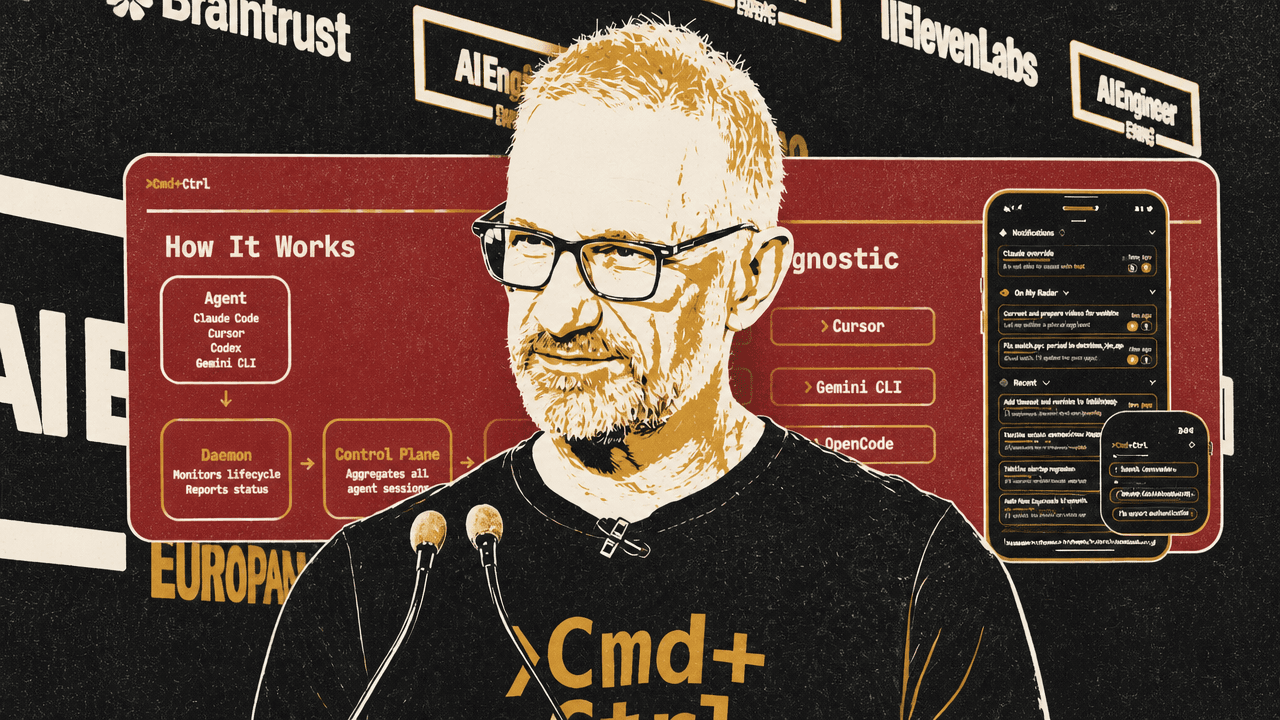
Cmd+Ctrl’s interface is organized around that state-management problem. On the iPhone app, sessions are grouped into categories such as those subscribed for notifications, those “on my radar,” recent sessions, and the broader archive. The slide and demo showed lists of sessions with names such as “Convert and prepare video for website,” “Fix watch grace period in daemon_hub.go,” “Update system architecture diagram,” and “Summarize contents of docs/public dir.” The point was not the content of those tasks; it was that the interface exposes a live inventory of ongoing and recent agent work.
Richman’s problem statement reduced the product to four questions: How do you know when an agent is stuck? How do you know when it is done? What if you want to start a new session while away from the development machine? How do you track all sessions at once? Cmd+Ctrl is his answer to those questions.
The product claim is shared session state, not mobile chat as a side channel
The most important detail in Richman’s handoff demonstration was that the phone and terminal were operating on the same session. He started a Claude Code session in a terminal, issued a simple prompt, and the session appeared in the Cmd+Ctrl mobile app. When he opened it on the phone simulator, the agent response matched the terminal because, as he emphasized, it was the same session.
The prompt itself was intentionally ordinary. Richman said he was not demonstrating Claude Code capability; he was demonstrating Cmd+Ctrl. From the mobile app, he subscribed to that session for notifications and sent a new instruction. He then left the app so the push notification would be visible when the agent completed. Tapping the notification took him back into the session, where the response was available. Returning to the terminal and resuming the session showed the phone-originated message and the agent response there as well.
That is the core operating claim: a developer can leave the terminal, walk away with a phone, receive a push notification when the agent has an answer or needs attention, respond remotely, and later pick up in the terminal without losing continuity. The phone view is not presented as a separate chat transcript or a summary pasted back into the tool. In the demonstration, it was a control surface over the same underlying interaction.
Richman made the same point from the opposite direction by starting a new session from the mobile app. In Cmd+Ctrl, he selected a configured agent — he used Claude Code, while the interface also showed options including Codex, GitHub Copilot, and Cursor — chose a working directory, and sent a simple prompt. The agent responded in the app. He then moved to the terminal, resumed the session that had been created from the phone, and continued the conversation there. The mobile and terminal views stayed in sync.
The operational claim is that the place where work begins does not have to be the place where it continues. Richman said he often starts his day by issuing prompts from bed, starting several sessions, and later resuming them either in the CLI or continuing on the phone. The examples were trivial by design; the substantive point was remote initiation, push-based attention, and continuity back into the existing coding environment.
When sessions accumulate, the interface has to manage attention
Richman’s session-management demonstration addressed the accumulation problem rather than any single prompt. The Cmd+Ctrl app showed a long list of categorized sessions: notifications, “on my radar,” recent, and available. He said there were thousands of sessions in the system and that he could not possibly keep track of all of them manually.
The distinction between categories is part of the attention model. Sessions in the top section are ones the user subscribes to for push notifications. “On my radar” is for sessions the user wants to monitor without receiving a push for every message. “Recent” covers roughly the last 24 hours, followed by the rest of the available session history. The interface is meant to reduce the need to remember which terminal tab or remote machine contains which agent state.
Cmd+Ctrl also includes an overview dashboard. In the demo, it was labeled “Bring Me Up To Speed” and summarized recent activity across sessions. Richman described it as a standup-style summary built from the last several messages in each recent session. The visible example included a summary line about “npm release, commit, push, and publish.”
This matters because the user’s burden shifts as agents multiply. If a developer has one assistant session, the interface can be a chat window. If the developer has many sessions across several agents and machines, the interface needs to answer different questions: What changed? Which sessions are blocked? Which are noisy but not urgent? Which have completed? Which are worth resuming?
Richman described Cmd+Ctrl as session management, notifications, cross-agent access, and remote interaction in one place. In his words, this is the kind of thing needed in a “new world of agent orchestration,” where developers are no longer simply watching one model produce one answer.
The architecture separates agent-specific daemons from a shared control plane
The architecture Richman described has three main layers. Each agent platform — Claude Code, Cursor, Codex, Gemini, OpenCode, and others — has a Cmd+Ctrl daemon running alongside it. That daemon monitors the agent lifecycle and reports state changes, such as when a session is blocked or needs help. Those reports go to a control plane. The UI then talks to that API layer and delivers notifications or sends user input back.
The slide shown during this explanation presented the flow as: Agent, Daemon, Control Plane, UI. The agent box listed Claude Code, Cursor, Codex, and Gemini CLI. The daemon “monitors lifecycle” and “reports state.” The control plane “aggregates all agent sessions.” The UI includes iPhone, Android, Watch, and Web.
| Layer | Role in Richman’s architecture | Examples shown |
|---|---|---|
| Agent | The coding tool where the session runs | Claude Code, Cursor, Codex, Gemini CLI |
| Daemon | Runs alongside the agent, monitors lifecycle, and reports state | Agent-specific Cmd+Ctrl daemon |
| Control plane | Aggregates sessions across agents and machines | Shared API/control layer |
| UI | Lets the user monitor, receive notifications, and interact | iPhone, Android, Watch, Web |
Richman emphasized that the control plane aggregates agents regardless of where they are running or what framework they use. A developer might have Claude Code on a Mac and Codex CLI running on a cloud VM; Cmd+Ctrl is intended to expose both through one UI. The requirement, as he stated it, was “a single pane of glass into all of my agent sessions,” independent of platform and machine.
The daemon layer is open source, according to Richman. He said that means other agent frameworks can plug into it and be accessed through the same UI. The broader design choice is tool agnosticism: Cmd+Ctrl is not betting that one coding agent becomes the only surface. It assumes developers will use multiple agents and that those agents will continue to live in different native environments.
Richman summarized the intended reach plainly: “Whatever your agent, you can reach it, and it can reach you.”
He tied this back to the autonomy gap. The aspiration is maximally autonomous agents, but he argued that current agents are not there yet, especially if interaction is limited to their native environments. Cmd+Ctrl addresses that limitation by changing the interaction surface rather than claiming to remove the need for human input.
The new flow is agent choreography, not uninterrupted focus on one task
Richman’s broader claim is that agentic coding has changed not only software development work, but also the experience of doing that work. He contrasted an older concept of flow — a developer locked into one codebase, hyper-focused on a single problem — with what he called the new flow: “agent choreography.”
In that model, the developer is not primarily typing through one task. The developer is moving among multiple agents working in parallel, unblocking one, redirecting another, and coordinating the results. Richman said the satisfaction comes from “the elegance of that choreography and the results on the other side.”
That change is also why FOMAT is not just a notification problem. If the developer’s role becomes orchestration, then missing an agent’s blocked state means the choreography stalls. But Richman also warned against interpreting always-available agents as a mandate to work all the time. He said the paradigm highlights the importance of time away from agents.
The cognitive load of managing multiple agent sessions is high, he said, and exhausting. He referenced prior discussion by Matt Pocock and an interview with Simon Willison on Lenny’s podcast as examples of this point being in the air, but his own conclusion was practical: developers need breaks, and breaks are often when good ideas arrive. The right system should let a developer reach agents during those breaks when appropriate, not require constant desk presence.
The slide summarizing this point said: “Not working all the time but working at the right times. Wherever you happen to be.” That is the version of FOMAT relief Richman argued for. Not a world where the human never steps away, and not a world where agents never need help, but one where the handoff between human availability and agent need is no longer trapped inside a terminal tab.