AI Agents Need Bounded Loops, Observable Goals, and Approval Boundaries

OpenAI developer-experience lead Jason Liu argues that Codex is most useful when treated as a set of durable, bounded workstreams rather than a succession of disposable chats. His model starts with a pinned thread that retains context and reports on a defined condition, then adds persistent goals only where completion can be verified, and durable memory, skills and broader computer control only when repeated work warrants them. The governing constraint is explicit: give the system enough context to prepare useful work, but keep action and approval boundaries clear.
Build one workstream before building an agent organization
Jason Liu recommends treating a Codex thread as a durable home for a bounded piece of work—not as a disposable prompt. For Liu, the first useful shift is from chat to workstream: name a thread, pin it, let it retain what has happened, record what matters, and return to it when there is a reason to inspect the situation again.


That approach rests on Liu’s reported experience with compaction. He says the older advice to restart conversations after a few dozen messages, or to create a new thread for every feature and review, no longer reflects how Codex behaves in his work. He has kept threads active for five weeks and says some have involved roughly 400 sub-agents while remaining able to identify their jobs.
Compaction works really, really well. Like, I have threads now that are like five weeks old that have, you know, 400 sub-agents in them, and they generally just know what they need to do. They know what their job is.
This is not an argument for one sprawling conversation. Liu’s own pinned threads cover distinct functions: a chief of staff, the Agents SDK, the OpenAI CLI, open-source work, and Twitter monitoring. The boundaries are useful partly because they make active commitments visible in a sidebar. Liu compares the organization to folders: even if the system can move across them, the separation helps a person understand what work is under way.
The operating sequence he proposes is straightforward:
| Step | What the workstream needs | What it prevents |
|---|---|---|
| Pin it | A named, durable thread for a launch, project, support issue, pull request, or coordination function. | Restarting from an empty chat whenever work resumes. |
| Log what became true | Decisions, owners, blockers, current state, and next actions in the thread or a durable project record. | Reconstructing status from scattered messages and recollection. |
| Wake it deliberately | A scheduled check or another thread’s message when outside conditions may have changed. | Constant monitoring or forgotten follow-up. |
The underlying problem, in Liu’s account, is not only code generation or producing a first draft. It is remembering what happened, who is waiting, which Slack message matters, and which loose end needs attention. When every colleague and system is moving across multiple projects, the coordination burden grows quickly. Codex is useful to him when it reduces that burden without forcing him to manually reopen every relevant source.
A workstream should therefore begin narrow. Liu’s practical advice is not to start with a full personal operating system, broad permissions, and a network of agents that create more work than they remove. Begin with one thread that handles a meaningful job. Add complexity after that thread has demonstrated that it can preserve useful context and return a decision-ready update.
The first loop should report, not act
The clearest first implementation is a chief-of-staff thread: a pinned workstream that checks a defined group of sources on a schedule and returns one useful update. Liu’s model is deliberately more constrained than an assistant authorized to act broadly across a user’s accounts.
| Design choice | Chief-of-staff pattern |
|---|---|
| Scope | Slack, Gmail, Calendar, and relevant project notes. |
| Cadence | A weekday morning check; Liu’s example uses 8:30 AM, while his own thread has run at 8 AM or 9 AM. |
| Output | What changed, who is waiting, and what needs the user’s decision. |
| Action boundary | Draft replies; do not send. |
| Record | Include links to source emails and Slack messages where useful. |
| Stopping rule | Return minimal output when nothing has changed; do not keep checking once the stated condition is satisfied. |
Liu began with sparse instructions and adjusted the thread over time. He changed formatting, asked it to include source links, and at one point had it open a Chrome tab for each email that needed review. After returning from a meeting, he could find a set of prepared drafts waiting in the browser, inspect them, and decide what to send.
The point is not that every user should run this exact configuration. It is that a useful automation has a defined information boundary, a specific output, and an explicit approval boundary. The thread can prepare work without silently becoming the actor responsible for external communication.
Liu calls the scheduled return to a continuing thread a heartbeat. Earlier automation patterns created a fresh thread for each recurring task, such as a morning brief. He argues that sending the scheduled message into the existing thread is more useful because it lets the system compare new state with the context it already holds.
You should think of it as a way of scheduling a message back into the thread.
A heartbeat fits conditions that can change outside the system: a pull request may receive review feedback, CI may fail, an owner may respond to a support issue, or a project tracker may need an update. Liu’s $loop skill is a shorthand for that kind of instruction. A pull-request loop, for example, can watch for feedback, keep a branch rebased, verify CI, and report when the work is ready.
The cadence and output format matter. Asked how to avoid token-consuming loops that repeat the same status, Liu suggested telling the thread to respond with a minimal “no updates” message when there is nothing new, reducing how often the heartbeat runs, and giving it a stopping criterion. He also cautioned against treating the highest reasoning setting as the default. Routine monitoring, straightforward form work, and basic computer tasks may be better served by lower or medium reasoning. Liu says his chief-of-staff automation runs at medium reasoning.
More elaborate setups can delegate across threads. Liu describes monitor threads that notice a new issue, create a downstream thread to triage it, and later notify that thread when matching evidence arrives. If related complaints keep appearing, the monitor can escalate to the human: the issue has remained open for several days, more reports are arriving, and a decision is needed.
He characterizes this multi-thread pattern as new and not fully baked. The smaller lesson is sturdier: a loop should wake a thread because it has a defined condition to inspect, not merely because the system can run.
Use a goal only when completion can be observed
A heartbeat returns to inspect changing external state. A goal is for work that should continue until it satisfies a test.
Liu describes /goal as a persistent loop with a verifier. The user specifies an outcome and a condition that demonstrates completion; if the verifier fails, the system keeps working. He says this works particularly well when the proof is clear.
“Migrate the backend to Rust” is broad and open-ended. “Migrate the backend to Rust and make sure all unit tests pass” supplies an observable finish line. Liu says he has used this kind of structure for experimental software rewrites, including migrations that he does not present as ordinary production practice. The important constraint is not the programming language. It is the presence of a verifier.
His ultragoal skill makes the same structure inspectable by storing the task state in files rather than leaving it solely in a running thread.
| File | Role in the long-running task |
|---|---|
| goal.md | Defines the outcome, constraints, permissions, and proof of completion. |
| plan.md | Breaks work into phases and identifies the current next step. |
| state.md | Records the current issue and safe actions for resuming work. |
| worklog.md | Keeps evidence from attempts and verification. |
This structure accommodates change. A project may gain scope, reveal a new constraint, or require a revised plan while the loop is running. Editable goal and plan files let the system update its working understanding rather than relying on a large conversation record alone. For work that runs a day or two, Liu says he can inspect the work log or ask a side chat to summarize it instead of reading session data directly.
The distinction is a useful decision rule. Use a heartbeat when the agent must check again because the world may change. Use a goal when repeated work is justified and completion can be demonstrated. If neither condition applies, a normal thread and human review may be the better tool.
Durable context and skills should earn their complexity
Liu’s vault is a Git-backed monorepo that stores project notes, people records, instructions, skills, loose notes, and summaries. It is his answer to repeated work that depends on context scattered across messages, documents, and applications.
The vault is not where all code has to live. Liu may have many repositories for demos, slides, and applications, but he does not want each repository to become a separate top-level Codex project. He begins work in the vault and uses an AGENTS.md instruction to route code into ~/dev. The vault retains the project context and operating record; code remains in its appropriate repository elsewhere on the file system.
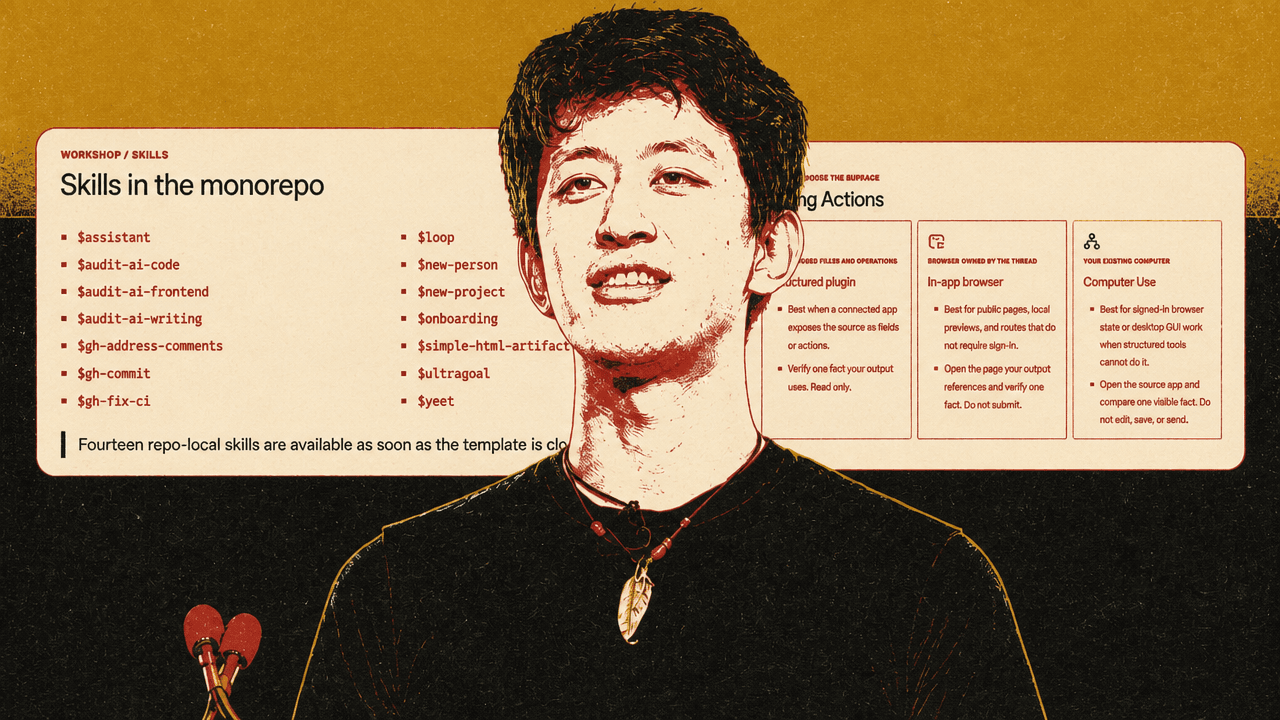
His jxnl/personal-monorepo-template includes onboarding, project and people creation, code and writing audits, GitHub workflows, CI fixes, loops, and HTML-artifact skills. But the template is less important than the underlying pattern: if the system repeatedly needs to know the same people, channels, decisions, and procedures, give that information a durable, inspectable home.
Liu says the most useful records in his own setup are projects and people. A project file can identify relevant Slack channels and resources. A person record can include email addresses, Slack identities, work context, and relationships. These files are retrieval paths. They reduce the need to reconstruct the same context in each request.
He improved results by making those paths explicit. Once relevant Slack channels appeared in project-file front matter, the model could discover and read them. When a system misses context it should have used, Liu’s response is to update the project record, skill, or instruction that ought to point to the source.
Git makes the resulting memory reviewable. Liu says he can run git diff after a few days to see what the model changed: perhaps someone responded, an issue was closed, or a project record was updated. The vault is both working context and a record of the system’s changing understanding.
It is not a settled solution to memory management. Liu still uses Obsidian and does not regard agent memory as a replacement for keeping records. Asked about memory bleed between unrelated projects, he did not claim to have a comprehensive answer. His current practice is to use project-specific README and AGENTS.md files and correct local conflicts, such as different package-manager requirements. He suggested project-level scoping may matter, but said he had not examined the underlying memory behavior deeply.
That uncertainty is a reason not to begin here. A chief-of-staff thread can be useful without a personal CRM. A vault becomes worthwhile when the same work repeatedly depends on context that should not be rediscovered.
Skills follow the same threshold. Liu defines a skill as reusable instructions, judgment, references, and scripts for a job that repeats. A plugin packages skills with the applications that supply context or permit action.
His recommended sequence is: perform a workflow manually, identify its judgment calls and approval boundaries, capture those in a skill, connect the necessary systems, and package the workflow when it is useful to others. The purpose is not ceremony or another slash command. It is preserving decisions that would otherwise remain tacit.
Liu’s developer-experience triage skill records which Slack channels matter, which engineers own particular areas, where feedback arrives, and what information to request when someone reports a regression. If a feedback ID is required, the skill can ask for it consistently rather than relying on someone to remember that step.
For personal workflows, Liu often starts quickly, corrects the skill after mistakes, and permits it to revise itself as it learns. He calls this a “YOLO one-shot” approach. A skill used successfully for two months, he says, becomes a stronger candidate for team use because its behavior has been tested in real work.
Team-facing skills deserve more care. Liu says conventional evaluation is difficult when a workflow touches live Slack, email, documents, and changing project state; he cannot simply snapshot all of Slack and replay it. His alternative is operational iteration: observe the workflow, correct it, preserve the correction, and formalize confidence over time.
Bring in richer context before granting broader control
Liu divides work into three acts: bring context in, work on it, and write results back out. His preferred input is often not a carefully edited prompt but a long, messy voice memo.
The workshop slide attributes the comparison to a 2018 study by Ruan and colleagues at Stanford University and Baidu Research. Liu’s argument is not simply that speech is faster. Speaking lets him include uncertainty, tangents, partial recollections, and incomplete identifiers that he might omit while composing a clean written request.
He might tell the system that there was probably a meeting with Charlie sometime last week about the Agents SDK, perhaps a relevant email or Slack conversation, and ask it to find the material and turn it into a useful memo. Liu would not send a colleague an unstructured 15-minute voice message; he is comfortable giving one to a system that can search connected sources and create a work product.
Asked about elaborate metaprompting, Liu said he generally prefers the model to construct the operational prompt or goal. The human judgment is more usefully spent deciding what the work should become: a thread, a goal, a reusable skill, an email draft, a one-pager, or another artifact.
Plugins connect Codex to Slack, Gmail, Calendar, Notion, Linear, and other work surfaces. Initially, users may need to tag a particular connector. Liu says that, over time, pinned threads, project records, and memory can make a broad request more workable: “What changed about the launch?” can lead the system to inspect messages, meetings, and project state without a connector being specified in the prompt.
Appshots are a more specific mechanism for supplying context. Liu argues that they are more useful than ordinary screenshots because they include an application’s accessibility tree alongside the visible image. A screenshot of a Slack thread may require OCR and multiple searches to identify the channel, the participants, and appropriate actions. An Appshot can, in Liu’s description, expose the channel ID and user IDs directly.
That can reduce the steps between seeing an issue and preparing a structured response. Liu’s example is attaching an Appshot of a Slack conversation, invoking a triage skill, and asking the system to investigate and prepare a reply. The model can combine what is visible with application metadata to locate the relevant team and next action.
The ordering matters: improve context through voice, connected sources, project records, and Appshots before expanding what the system is allowed to do. Better context can reduce errors without broadening permissions.
Expand the action surface last, with explicit boundaries
Liu distinguishes three action surfaces:
| Surface | Best fit | Examples Liu gives |
|---|---|---|
| Structured plugin | A connected app exposes the necessary fields and actions. | Slack, Gmail, Calendar, and project tools. |
| In-app browser | Public pages, local previews, or work that does not require signed-in browser state. | Viewing a local slide deck or inspecting a public page. |
| Computer Use | Signed-in state, desktop GUI work, or cross-app workflows where structured tools are insufficient. | Forms, iMovie, native-app testing, and document workflows. |
The Chrome extension controls Chrome; Computer Use can operate more broadly across applications. Liu describes using Computer Use in iMovie despite not knowing the software well: it helped locate sound effects, place them at timestamps, and export a video.
I don't really have the time to like learn new software, but if Codex can just show me what's going on, it's pretty awesome.
He also says Computer Use has changed how he tests applications. Native interfaces can be exercised through computer control, while websites can be tested in the in-app browser. He lists forms, service workflows, desktop applications without APIs, and iPhone screen mirroring from a Mac as potential uses.
But the ability to move between surfaces also changes the risk. Liu notes that a model blocked from uploading through a Slack connector may open a browser and use a file-upload dialog instead. A model unable to send email through a Gmail connector may open Chrome and press Send. Finding another route can be useful when it serves an approved objective; it can also defeat an assumed limitation.
His preferred balance is not a prompt for every action and not unconstrained “YOLO” permissions. He points to auto-review, clear instructions in AGENTS.md, and organization-level restrictions. An instruction file can require approval before opening a pull request, prohibit edits to certain documents, or route code to a specified location. At OpenAI, Liu says, organization settings can restrict actions such as sending messages to non-OpenAI email addresses or posting to external Slack channels.
The destination matters as much as the action. A system can gather evidence, correlate feedback, prepare a reply, draft a pull request, update a tracker, and monitor the result. But it should leave an email or Slack message as a draft, save an artifact where the work belongs, or publish only when the approval boundary is explicit.
Liu’s video-editing example illustrates both initiative and constraint. While biking, he asked the system to locate an iMovie project, read Slack feedback, export the video, share it, and monitor the feedback thread for further comments. The system found that Google Drive was a simpler way to maintain a single shareable URL than repeatedly uploading through Slack. The workflow had a defined objective and a specified follow-up loop. Without clear permitted surfaces and a clear delivery boundary, the same initiative would be much harder to trust.
The human role is taste, relationships, and proof
Liu says he tries not to watch agents work. In the office, he uses that time to talk with people, learn what they are doing, find points of connection, and supply context the system cannot obtain on its own.
That perspective shapes his advice to students entering software work. As direct manipulation of a text editor becomes less central, he expects taste and vocabulary to matter more. His recommendation is to consume more products, learn what good onboarding feels like, build applications that frustrate their creators, and develop language for identifying exactly why something is poor.
He compares that ability to cooking: without knowing the ingredients, someone cannot distinguish “too salty” from “needs acid.” The equivalent in software is being able to identify why an interface, document, demo, or generated artifact fails—not merely that it feels wrong.
That vocabulary is operational. It helps someone set standards for a skill, recognize a weak generated artifact, specify a revision, and decide whether the evidence is sufficient to call work complete. Liu’s own slide workflow makes the division clear. Codex can create and serve a deck in the in-app browser, but Liu presents it, selects the region that fails, and directs a revision to whitespace, structure, or layout.
The final discipline is to preserve what became true: the relevant thread, the draft location or artifact path, the owner or lack of one, the current state, the approval boundary, and the next action. That record is what lets a later heartbeat, another thread, or a human reviewer continue the work without beginning from scratch.