Fine-Tuning Pushed FunctionGemma From 46% to 90% Function-Calling Accuracy

Cormac Brick, a Google AI Edge engineer, argues that on-device agents are becoming practical when developers either use system models such as Gemini Nano through Android AI Core or ship narrow, fine-tuned tiny models with LiteRT-LM. His main example is FunctionGemma, a 270 million parameter function-calling model that rose from about 46% accuracy out of the box to more than 90% on most tested app-intent functions after synthetic-data fine-tuning. Brick presents the tradeoff plainly: system GenAI is easier when it fits, while app-shipped tiny models require more work but can run locally, offline, and with more control.
Fine-tuning turned a tiny function-calling model from 46% success into a usable app component
Cormac Brick’s clearest example of what tiny on-device models can do is FunctionGemma: a 270 million parameter function-calling model based on Gemma 3 technology. Brick says that, in an app-intents example with functions such as adding a calendar item or adding email, FunctionGemma reached about 46% success out of the box. He describes giving the fine-tuning workflow “these seven functions,” then reports the resulting evaluation across ten functions: over 90% success on eight of the ten, with the other two in the 80s. The source leaves that mismatch unresolved, but the direction of the result is clear in Brick’s account: synthetic-data fine-tuning made the small model much more reliable for the target function-calling task.
| Condition | Reported result |
|---|---|
| FunctionGemma out of the box on the app-intents task | About 46% success |
| After synthetic-data fine-tuning | Over 90% on eight of ten functions; two functions in the 80s |
The result matters because FunctionGemma is small enough to ship inside an app and fast enough to run on older phones. Brick says that on a Pixel 7 it can process almost 2,000 tokens per second in prefill and about 140 tokens per second in decode. The slide gives the precise figures as 1,916 tokens per second prefill and 142 tokens per second decode.
Brick presents fine-tuning as the tradeoff for robust tiny-model deployment. With a larger model, or with AI Core on a device, a developer might provide functions through a system prompt. At the 270 million parameter scale, Brick says the workflow shifts: define the functions, synthetically create a dataset, train, evaluate, and export. In Google’s workflow, he says they used Flash to generate synthetic data.
The FunctionGemma fine-tuning lab shown is a Hugging Face Space. It lets a developer define function schemas, optionally upload training data, train and evaluate, and export. The slide’s example CSV format is [User Prompt, Tool Name, Tool Args JSON], with a weather query mapped to a get_weather call. Brick says this workflow is recommended for high-reliability function calling.
Function calling is where Brick is most explicit about the work required to make a tiny model reliable. Prompting is simpler. Fine-tuning is more work. But in his account, that work is what allows a small local model to provide robust function calling inside an app.
Developers have two on-device paths: use the system model or ship their own
Brick frames on-device agents around a practical split for developers. If the task can use intelligence already built into the operating system, the starting point is system-level GenAI: Gemini Nano through AI Core on Android. Brick briefly points to Apple Intelligence writing tools on iOS as another example of system-level intelligence, while noting he knows less about Apple’s implementation. If the task is more specialized, or needs to be customized beyond what the system exposes, the alternative is in-app GenAI: a model packaged with the app or webpage and run through LiteRT-LM.
The reasons Brick gives for running AI locally are latency, privacy, offline use, and “reliability or savings,” depending on the case. The more important distinction is what the developer gets in exchange for each route. System GenAI is the higher-capability, lower-friction option when it fits. The model is preloaded, deeply optimized, and does not increase the app’s size. Brick describes Gemini Nano’s base models as Gemma 4 E2B and E4B, in the “small language model” range of roughly 2 billion to 4 billion parameters.
In-app GenAI is the more labor-intensive route, but it gives the developer more control. LiteRT-LM is Google’s runtime for integrating local LLMs into an application. It is aimed at “tiny LLMs,” which Brick defines as models under a billion parameters, typically in the 100 million to 1 billion parameter range. Those models are small enough to ship with an app, run across a broader set of devices, and be fine-tuned for narrow tasks.
| Path | Where the model lives | Typical model size | Developer tradeoff |
|---|---|---|---|
| System GenAI | Preloaded with the device, exposed through system APIs such as AI Core | Small language models around 2B–4B parameters | Most capable and optimized, but limited to available system use cases |
| In-app GenAI | Loaded with the app or webpage through LiteRT-LM | Tiny language models around 100M–1B parameters | More customization and reach, but more work for the developer |
The Google AI Edge stack behind that split includes MediaPipe and LiteRT-LM running on LiteRT, the runtime formerly known as TensorFlow Lite. Brick says LiteRT can target CPU, GPU, or NPU depending on the platform and what the developer chooses. A version of LiteRT is built into Android OS; according to internal Android data shown on the slide, it is used by more than 100,000 Android apps, supports more than 2.7 billion devices, and averages more than 1 trillion daily interpreter invocations in Android.
Brick also emphasizes that the stack is not Android-only. The slides describe .tflite and LiteRT-LM deployment across Android, iOS, macOS, Windows, Linux, Web, IoT, and embedded targets, with CPU, GPU, and NPU backends where available.
The skill harness keeps the prompt small by loading tool instructions only when needed
Google AI Edge Gallery is Brick’s example app for local LLMs on Android and iOS. The app can use AI Core when it is available to provide the Gemma model, and it also showcases tiny models and third-party models such as Qwen and Phi. Brick says the Android version is open source and built with LiteRT-LM; the iOS code is expected to be open sourced after the Swift API work is finished.
One skill lets a user ask, in French, for a French restaurant in San Francisco while requesting the reply in English. The on-device agent looks up local French restaurants and selects one with a roulette-wheel interface. Brick presents it as a small example of an agent harness on top of Gemma 4: not a large framework, but a prompt-driven structure that can call skills and render app-specific UI.
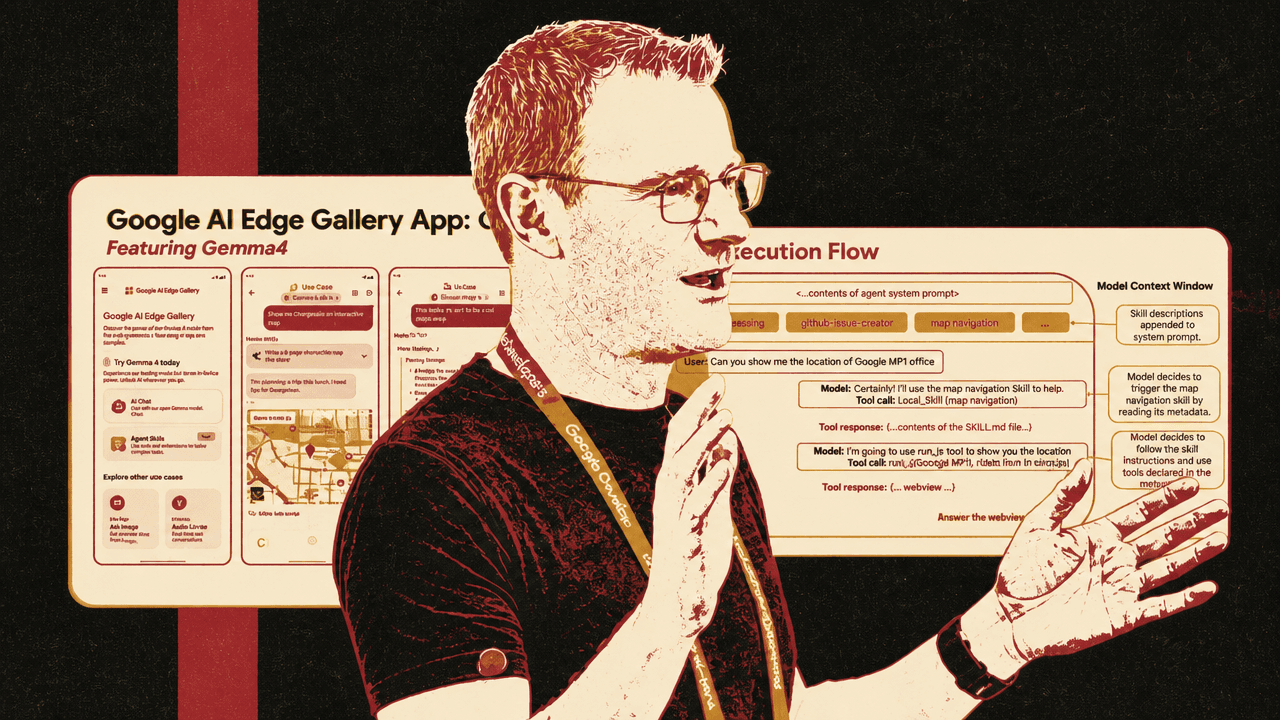
The design matters because the model is not given the full implementation of every skill up front. The app has its own system prompt, and the skill descriptions are appended to that prompt so the model knows what kinds of skills are available. Detailed instructions are loaded on demand through a Load_Skill tool call.
The skill-execution diagram makes the sequence concrete. A user asks, “Can you show me the location of Google MP1 office.” The model replies that it will use the map navigation skill. It calls Load_Skill(map navigation), receives the contents of the corresponding SKILL.md file, then decides to use a JavaScript tool to show the location. The tool response is a webview, which the app renders. The slide’s point is that the model context initially carries the agent system prompt and skill descriptions; the full instructions and declared tools arrive only after the model has selected the relevant skill.
| Step | What the harness provides |
|---|---|
| System prompt | The app’s own agent instructions |
| Skill descriptions | Short metadata appended to the prompt so the model can decide which skill is relevant |
| Load_Skill tool call | On-demand retrieval of the selected skill’s full instructions, such as a SKILL.md file |
| Skill execution | The model follows the loaded instructions and uses declared tools, including JavaScript rendering when needed |
| App rendering | The app displays the result, such as a map webview or roulette-wheel interface |
That division—metadata first, full instructions later—is the core of the harness. The model sees enough to decide which capability to invoke, but it does not carry every tool’s full instruction set in the context window until it chooses one.
The model is aware of the types of skills it can use, but it doesn't have to see all of the functions and details of the skill. That's only kind of loaded on demand.
Because the agent runs inside an app, skills can include simple JavaScript that the harness calls as part of execution. Brick points to the map-navigation UI and the restaurant roulette wheel as examples: the model can decide to use a skill, and the app can render a small custom interface rather than returning only text.
Brick also describes a workflow for making skills with LLMs themselves. The prompt shown gives a model the Edge Gallery skills README, example skills, a target skill spec, and access to a device through adb for debugging. The example skill is a “Read it Later” offline archiver: classify the subject of a photo locally, fetch a Wikipedia summary through a public API, then save the image and summary to the device’s Downloads folder for offline reading. Brick says his team has made about 80 skills using Gemini CLI or Claude Code, and that they also use an adb skill internally to test on devices.
The skill format is meant to be distributed through ordinary URLs. In the app, Brick says a user can load a custom skill from a URL, such as a GitHub-hosted skill definition. The GitHub examples shown include Blackjack, proxy parsing, equation calculation, dice probability distributions, Catan board generation, National Trust planning, and cat entertainment. Brick says people can tell Google about a created skill in GitHub discussions so others can check it out, and notes that the skill system had only been public since the prior Thursday, so the examples were early rather than mature evidence of the ecosystem.
Gemma 4 can choose among skills, but single-turn multi-skill plans remain harder
During the Q&A, an audience member asks how many skills can be stacked before tiny models start to degrade. Cormac Brick answers cautiously. His team had only been using the model for two to three weeks, and it had been public for about one week.
For the 4 billion parameter model, Brick says the default app setup enables about eight skills, and the model can choose between them “reasonably well.” He also distinguishes between two kinds of multi-skill behavior. In a conversation, the model can use one skill, then another, then another: for example, finding a fact through a Wikipedia skill and then showing a related location in Google Maps. Brick says that works robustly.
The harder case is a single user interaction that requires the app to know it should call multiple skills as part of one answer. That works sometimes, but Brick says his team is still trying to make it more reliable.
We're still kind of discovering the limits of how far we can push the model.
The harness is deliberately simple, and the early results are promising for skill selection and sequential use within a conversation. Brick does not claim that the current system reliably performs complex, multi-tool plans in one turn.
Tiny models need narrow tasks and an edge-oriented deployment workflow
For app-shipped models, Cormac Brick lays out a workflow that begins with models in Transformers and ends in an edge-optimized package. A developer typically starts with a Hugging Face model using PyTorch and safetensors. The model can be prebuilt or fine-tuned. LiteRT-Torch exports and optimizes it, including quantization, and LiteRT-LM then runs it through a cross-platform inference pipeline.
| Stage | Role in Brick’s TLM workflow |
|---|---|
| Transformers | Start with PyTorch small language models using safetensors, hosted on Hugging Face |
| Prebuilt or fine-tune | Use an existing tiny model or adapt it for a narrow task |
| LiteRT-Torch | Export from PyTorch and apply native and LiteRT optimization, including quantization |
| LiteRT-LM | Run cross-platform, accelerator-backed inference through the edge LLM pipeline |
| Deployment | Showcase in AI Edge Gallery or integrate in production with LiteRT-LM |
Brick says LiteRT-LM uses a single file format that packages what is needed to run the model. It is open source, works across platforms, and at the time of the talk has C++ and Java APIs available, with Swift and JavaScript APIs coming soon. The slide lists LiteRT-LM’s pipeline components as tokenizer, multimodality, multi-session, file loader, and LLM model execution.
For smaller models, Brick says there are two common routes. One is to pick a fixed-function model, such as a vision-language model or transcription model. The other, which he says Google has seen commonly, is to fine-tune a model for a narrow task, often using synthetic data. The reason is scale: once a model is down around 200 million or 100 million parameters, Brick says it usually needs a tightly focused job to work well.
He gives two examples of the export-and-run flow. One is Qwen3-0.5B exported and run on desktop with litert-lm run using a GPU backend. The other is AppleFastVLM, a 500 million parameter visual-language model, running through the stack with Qualcomm NPU acceleration. The mobile screenshot shows the model describing an outdoor campus scene with buildings, glass facades, benches, trees, steps, and sunlight. Brick’s point is that a small specialized model can perform a useful multimodal task quickly when optimized for on-device hardware.
Prebuilt tiny models are also part of the route. The Hugging Face collection shown includes litert-community/gemma-2b-it, litert-community/gemma2-2b-it, litert-community/FunctionGemma-AB-27, and litert-community/Gemma-2-270M-it. Brick points developers there for models that are already packaged for the LiteRT community workflow.
LiteRT-LM replaces task files for LLMs, not for every MediaPipe use case
An audience member asks where LiteRT-LM fits for developers accustomed to converting a model from PyTorch to TFLite, quantizing it, and bundling it into a MediaPipe .task file. Cormac Brick gives a specific answer: for stock LLMs, the LiteRT-LM file format is effectively the replacement for .task.
He does not describe .task files as obsolete in general. They remain useful for MediaPipe tasks that package more than an LLM model. A face mesh task, for example, includes other code around the model. For LLMs, Brick says Google wanted a dedicated and simpler format that works with open developer tooling. The LiteRT-LM file bundles the tokenizer and related model assets, but it is “just the LLM model.”
Asked about CPU performance, Brick does not give new numbers in the session. He points to a separate performance presentation by colleagues and to the Gemma LiteRT-LM model card, which he says is updated when new performance numbers are available on new platforms. He gives selected speed examples for FunctionGemma and hardware-accelerated VLM inference, but not a CPU benchmark in response to the question.
Eloquent shows how several tiny models can be chained while keeping data local
Cormac Brick uses Eloquent, a Google AI Edge transcription app, as an example of how tiny models can be composed in an application. The availability is somewhat uneven in the source: the slide says “Available now on iOS,” while Brick says it is not available in Europe, “not available widely yet,” and “will be available.” The app itself is less important to his argument than its architecture.
Eloquent’s user flow is local dictation followed by automated polishing, style testing, optional manual editing, and copying the result. The personalization features shown include dictation history, gamification stats, custom dictionaries, and Gmail-based vocabulary extraction. Brick emphasizes the transcription case that many users will recognize: names, technical jargon, and frequently used terms are often where generic transcription systems fail. Eloquent uses a personal dictionary so the on-device system can handle those terms better.
The architecture slide shows microphone input passing through an ASR engine, then a text-polishing engine, into the Eloquent UI. Personal context, a personal dictionary, and manual dictionaries feed the system. The slide states that the app is “fully offline” and that conversations never leave the device.
Under the hood, Brick says Eloquent chains two tiny models built with Gemma 3 technology: an ASR engine and a text-polishing engine. Each model is only a few hundred million parameters. Together, he says, they create an offline transcription service that can use a personal dictionary and remove filler such as “umms and aahs.”
That composition is the pattern Brick is trying to make legible. Tiny models are not presented as drop-in replacements for large general models. They are narrow components: one model transcribes, another polishes, a personal dictionary improves domain-specific vocabulary, and the app keeps the data on device.