VS Code Unifies Local, Background, and Cloud Coding Agents

Microsoft’s Liam Hampton argues that coding agents should be chosen by the amount of control a developer wants to keep, not treated as a single all-purpose assistant. In a VS Code demo using one repository, he assigns tests to a local Claude agent for hands-on iteration, a front-end build to a background agent isolated in a Git worktree, and open-source documentation to a cloud agent running through GitHub Actions. His case is that VS Code can act as the control plane for these modes, including Copilot, Claude, and third-party agents.
The agent choice depends on how much control the developer wants to keep
Liam Hampton’s practical frame for coding agents is not that one agent should handle everything. It is that different agent modes belong to different levels of developer involvement.


He split the workflow into three categories: local agents, background agents, and cloud agents. Local agents run in the developer’s immediate environment, such as VS Code, while calling either remote models or locally hosted ones. Hampton described them as “side-by-side,” interactive, and suited to human-in-the-loop work where the developer wants to watch, steer, and revise.
Background agents sit between full interaction and full delegation. In the Copilot setup Hampton showed, they can be driven through the GitHub Copilot CLI and accessed from VS Code. The key implementation detail is isolation: the background task runs in a Git worktree. Hampton explained a worktree as a branch mapped to an isolated folder or subdirectory within the workspace — “a chop of your code with its own little branch associated to it.” That makes it possible for an agent to work on a larger task without disturbing the developer’s active copy of the project.
Cloud agents are the more hands-off option. Hampton described them as running outside the local development environment on remote infrastructure, with the developer delegating work and monitoring progress rather than participating in each step. His own example was documentation: making a repository open source friendly, adding README and contribution material, and handling work he did not want to do directly.
The distinction matters because Hampton pushed back on a common expectation around agents: that a single prompt should generate a complete application or solve a project’s problems in one pass. He argued that this is “absolutely not the case.” Businesses asking about productivity, return on investment, code quality, and security need to be more deliberate about how they use these tools, including the cost of tokens and the flexibility of the agent system.
One code base, three problems, three separate agents fixed all at the same time.
In Hampton’s usage, tests belong to the local-agent category because he wants to be “in the weeds” and understand what is happening in the codebase. A front-end UI belongs to the background-agent category because it is substantial and time-consuming, but still something he wants to inspect locally before it becomes a pull request. Documentation belongs to the cloud-agent category because he is comfortable delegating it with minimal involvement.
VS Code becomes the control plane
Hampton’s claim for VS Code was that it can serve as a single entry point for these agent modes. The developer should not have to jump between disconnected agent surfaces — terminal agents, chat windows, separate editors, and cloud systems — unless the task demands it. In his framing, VS Code can host local, background, and cloud entry points, while also exposing third-party agents such as Claude and Codex alongside GitHub Copilot.
The point was not only convenience. Liam Hampton tied it to the “cognitive load of agents,” a phrase he picked up from a previous speaker. Developers are now surrounded by agent interfaces: CLIs, terminal sessions, editor sidebars, chat panes, and external services. His answer was to put the selection and customization of those agents in one place, so the developer can choose the appropriate operating mode without changing the basic workflow.
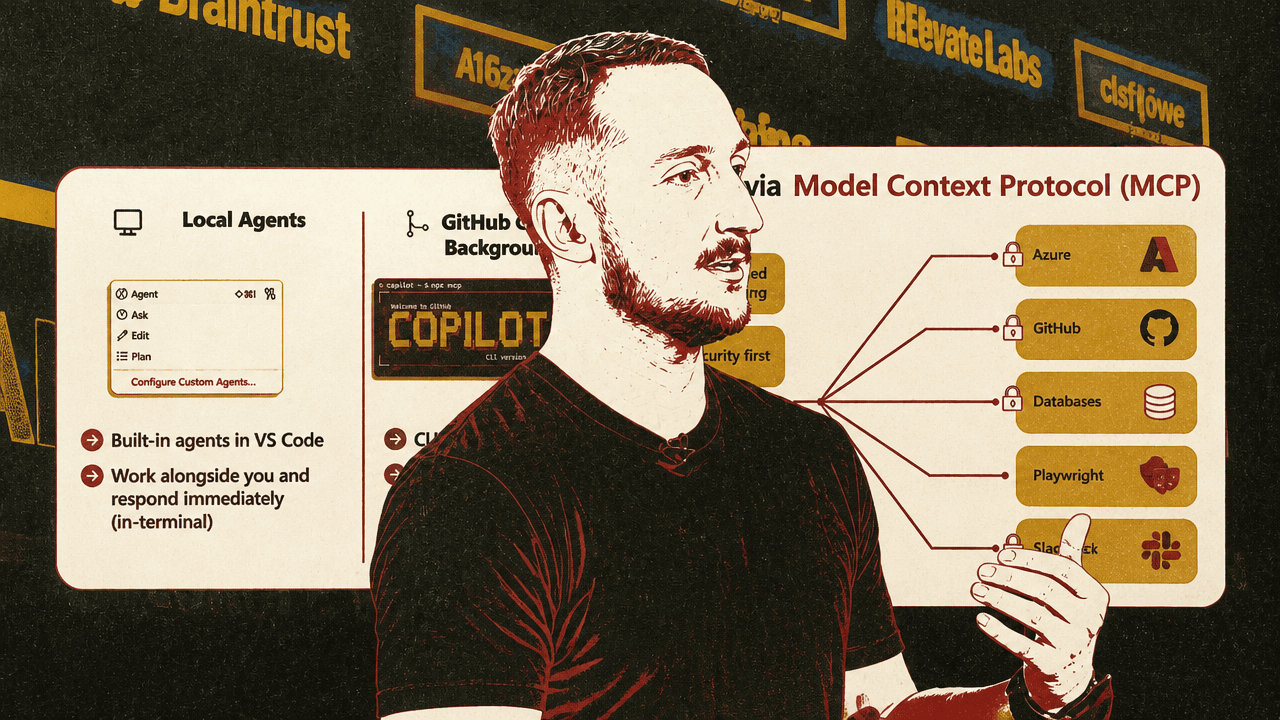
The slide Hampton used summarized the three modes this way: local agents are built into VS Code and respond immediately; background agents are CLI-based, autonomous, and isolated through Git worktrees; cloud agents run non-interactively on remote infrastructure and are best suited to team collaboration. Hampton then translated that into task selection:
| Agent mode | Developer posture | Example task Hampton used |
|---|---|---|
| Local agent | Hands-on, immediate, human oversight is important | Writing a test suite |
| Background agent | Partly delegated, long-running, locally checkable through a Git worktree | Creating a frontend UI |
| Cloud agent | Hands-off delegation for work he does not want to supervise closely | Writing documentation and open-source project files |
He was careful to say the concepts are not exclusive to GitHub Copilot. Although the example workflow used Copilot, VS Code, GitHub Actions, and Microsoft’s tooling, Hampton said the same ideas apply across AI agents more generally: define context, constrain behavior, decide where the agent runs, and choose the amount of human intervention required.
One repository carried three different risk profiles
Hampton’s demo worked from a simple Python CRUD application: a basic “Product Store” app with create, read, update, and delete behavior. The initial UI was minimal — just a product title, name and description inputs, and an add-product button. He described it as “not very pretty, not very good.”
From that single codebase, Liam Hampton assigned three different problems to three different agents at the same time.
The first problem was a GitHub issue asking for a user-facing web interface. The issue text said the current application was “primarily backend-focused” and needed a web-based UI so users could view products and add, edit, or delete them through a modern, responsive interface. Hampton asked a background agent to “summarise and plan a solution to issue 25,” using the CLI background agent path from inside VS Code.
He chose that mode because he wanted a mix of detachment and visibility. He did not want to hand the whole task to a remote cloud process, but he also did not want a constant back-and-forth over a large UI implementation. He enabled Autopilot, which he said was in preview, so the agent would not ask for approval on every tool call.
Hampton explicitly warned that Autopilot can be dangerous. The VS Code prompt shown on screen said Autopilot would auto-approve all tool calls, run commands, edit files, take terminal actions, and “make decisions on your behalf without asking for confirmation.” Hampton’s instruction to the agent reflected that risk boundary: start the work, but before creating a pull request, pause and let him test locally.
The second problem was repository hygiene. Hampton opened a new chat and started a cloud agent with the instruction: “MAKE THIS REPOSITORY OPEN SOURCE FRIENDLY. ADD ALL THE NECESSARY FILES.” In his words, this was work he did not particularly care to supervise. The cloud agent began creating files such as CONTRIBUTING.md and CODE_OF_CONDUCT.md, and Hampton later showed a pull request titled “Add open source community health files.”
The third problem was test coverage. Hampton noticed the project had no tests and selected a custom local agent inside VS Code. The custom agent’s instruction file said it was to write tests for the application, reference only files under ./src, and treat the app as a Flask-based REST API for product management with CRUD operations. Hampton selected a local agent and chose Claude Opus 4.6. He said he wanted “medium reasoning” because he wanted the loop to be fast; the visible model picker, however, showed Claude Opus 4.6 set to “Low” thinking effort, described as faster responsiveness with less reasoning.
This was the most hands-on part of the workflow. Hampton asked the test agent to “Write some unit tests,” watched it generate and run tests, and then noticed related code-quality issues. The application’s error handling was weak, so he asked the local agent to update route error handling and update the tests accordingly. That loop — inspect, ask, run, correct — was the reason he had chosen a local agent rather than delegating the work remotely.
I've got very much a hands-on to and fro with a local agent. I've got a remote agent doing some work for me, and I've got a background agent creating a new front end.
The visual contrast mattered. Before the background agent’s work, the Product Store page was a plain local page at 127.0.0.1:8000 with the title “Product Store,” two inputs labeled name and description, and an “Add Product” button. After the background task completed, Hampton switched into the Git worktree directory, ran the application, and showed a cleaner page with “Product Store,” “Manage your product catalogue,” an “Add a product” section, name and description fields, an “Add product” button, and a products area.
The background UI task also returned instructions for testing locally. Hampton challenged the initial instructions because the agent had been working in a Git worktree, asking how he should actually test it in that setup. That correction was part of the point: the background agent had more autonomy than the local test-writing agent, but Hampton still kept the result inspectable before pull-request creation.
The point was not that each output was perfect. It was that the developer could run three different agent operating modes against one repository, with different oversight levels, inside one VS Code-centered workflow.
Cloud agents run in GitHub Actions with limited access
Liam Hampton anticipated a practical question about cloud agents: what they cost, how they work, and what they can access. His explanation was that Copilot cloud agents run in GitHub Actions, in what he described as a safe, secure, ephemeral compute environment.
He emphasized isolation. The slide described built-in safeguards including network firewalls, branch isolation, and read-only access to the repository. Hampton said the agent is not allowed to talk broadly to arbitrary services; access is whitelisted and restricted. He also said it does not have access to the main branch, so it cannot push directly there.
Cloud agents can still use extended context through allowed MCP servers. Hampton said the cloud agent has access to the GitHub MCP server and the Playwright MCP server. That enables tasks such as interacting with GitHub context, performing screenshot-based testing, doing automated front-end testing, and writing workflows. He also referred to dynamic workflows, though he did not expand on them in detail.
In Hampton’s framing, the usefulness of cloud delegation depends on a controlled environment, bounded network access, branch isolation, and explicit context sources. In his example, those constraints made cloud agents appropriate for open-source repository files and documentation, rather than for work where he wanted to remain close to the code’s behavior.
Agent customization is part of the engineering surface
Hampton’s workflow depended not just on agent location, but on customization. Liam Hampton described four customization mechanisms: custom instructions, prompt files, custom agents, and agent skills.
Custom instructions define and store project context and rules for coding agents. The slide listed AGENTS.md and custom.instructions.md as places where these rules can live. Prompt files store clean, consistent, repeatable prompts using .prompt.md files. Custom agents configure different personas or roles for AI, tailored toward specific development tasks, using .agents.md. Agent skills are folders of instructions and resources that agents load when relevant, with SKILL.md shown as the relevant file.
Hampton described agent skills as a newer version of the older agents.md style of configuration, with the caveat that “there’s always like a new thing that’s coming out every single week now.” His point was that the exact naming and format may change, but the pattern is stable: developers should encode reusable project knowledge and task-specific behavior rather than repeatedly improvising prompts.
Inside VS Code, Hampton showed a recent Chat Customizations interface. From the Copilot chat pane’s settings area, he opened a single customization space with entries for local agents, skills, instructions, prompts, hooks, MCP servers, and plugins. Under agents, he showed his custom test agent alongside built-in agents such as Ask, Explore, and Plan. The visible description for Ask said it answers questions without making changes; the visible description for Plan said it researches and outlines multi-step plans.
He also showed skills such as address PR comments and create a pull request, which can be edited. Hooks were available as another customization mechanism, though Hampton did not have any configured in the example. MCP servers appeared in the same control panel.
This is where the “single entry point” claim became more specific. VS Code was not merely launching chats. Hampton presented it as a shared place to manage agent behavior: which agents are available, which instructions they follow, which skills they can invoke, which hooks run, which MCP servers extend their context, and which third-party plugins are present.
He also emphasized third-party support. Claude appeared in the same customization area, with access to Claude plugins, hooks, instructions, and skills. Hampton said the model is not restricted to VS Code and GitHub Copilot alone; the same workspace can expose and configure non-Microsoft agents.
MCP is how agents reach beyond the codebase
Liam Hampton introduced Model Context Protocol as the mechanism for connecting agents to external tools and services. He described MCP as a way to extend the LLMs or chat customizations a developer is working with, letting them interact with resources outside the immediate codebase.
His examples included Azure, GitHub, databases, Playwright, documentation sources, GCP, and AWS. He said authenticated services are locked down by authentication, while some MCP servers are free and open, such as Playwright and documentation-related servers like Microsoft Learn.
The slide framed MCP around “dynamic tool discovery,” security, onboarding, and “beyond tools.” Hampton did not give a full technical walkthrough of MCP server implementation, but he treated it as an important part of the agent architecture: if an agent needs context or capabilities from the developer’s toolchain, MCP is the path.
He also pointed to the “Awesome GitHub Copilot” repository at aka.ms/awesome-copilot, describing it as an open source collection of custom agents, prompts, and instructions. Although directed at Copilot, Hampton said the materials can be adapted for other AI tools. He also mentioned an Awesome Copilot MCP Server, shown as a community MCP server that stores Copilot customizations from the Awesome Copilot repository.
The discipline is matching autonomy to risk
The most important design choice in Hampton’s talk was not the model name or the specific VS Code menu. It was matching the agent’s autonomy to the risk and nature of the task.
For tests, Liam Hampton wanted local, interactive control. The output affected his understanding of the application and its error behavior, so he stayed close to the loop. For UI implementation, he tolerated more autonomy but kept the work local and inspectable through a Git worktree, with an explicit pause before pull-request creation. For open-source housekeeping and documentation, he moved the work to a cloud agent because he was comfortable being less involved.
That division also answers the productivity question Hampton raised at the beginning. Agent value does not come from assuming one-shot autonomy everywhere. It comes from deciding when the developer needs immediate feedback, when isolated background work is acceptable, and when remote delegation is good enough.