Playwright Lets Agents Test Feature Requests Before They Write Code

Microsoft’s Marlene Mhangami argues that AI-generated tests can make a codebase look healthier than it is, because agents often write tests that confirm their own implementation rather than validate the user-visible behavior a feature is meant to deliver. Her prescription is to reverse the common workflow: start from the feature request, have the agent write failing Playwright tests against expected behavior, then generate code to pass them. In a GitHub Copilot demo using the Playwright MCP server, she applies that approach to a toy-store search and filtering feature, with the browser showing the agent exercise the product experience directly.
The productivity problem is no longer whether AI can write more code
Marlene Mhangami framed the testing problem around a larger shift in software development: AI-assisted teams are producing more code, but more code is not the same as more productivity.


She pointed to GitHub Octoverse 2025 data showing that GitHub had its most active year ever, with about 1 billion commits pushed and 43.2 million pull requests merged per month, up 23% year over year. She then said that, by 2026, GitHub was seeing growth accelerate beyond those published figures. GitHub COO Kyle Daigle had recently said the platform was seeing about 275 million commits per week; extrapolated across a year, Mhangami said, that would imply roughly 14 billion commits.
A growing share of those commits, she said, are co-authored by AI agents. GitHub has not released the relevant data, but Mhangami said some agents make attribution easier because they co-sign commits, while others do not; GitHub can also infer some agent-written work from wording in code.
That growth raised the question she used to organize the rest of the argument: does AI actually make developers more productive?
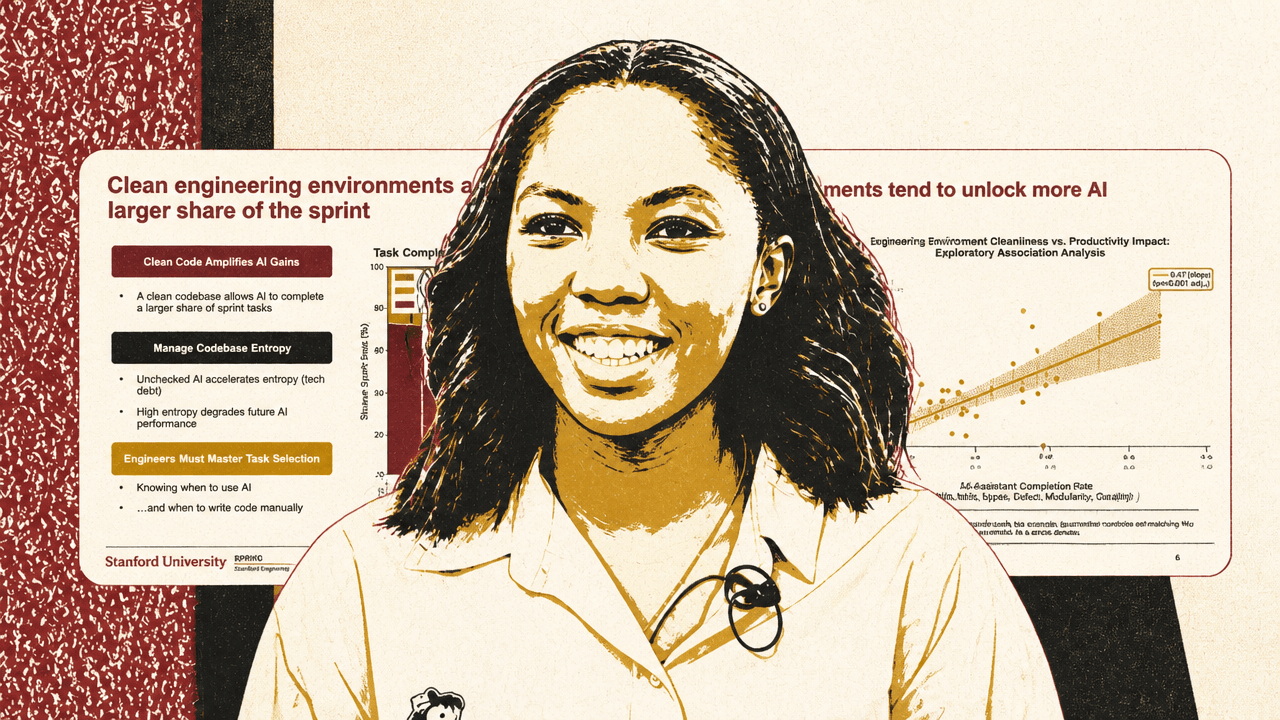
The answer, in her telling, depends less on whether teams use AI and more on the engineering environment into which they introduce it. Mhangami cited a Stanford University study of 120,000 developers, presented at AI Engineer in 2025 by Yegor Demidov-Blanch, as one of the strongest attempts she had seen to measure AI’s return on investment in software engineering. The study’s reported finding was not that AI uniformly improves output. It was that “clean engineering environments” let AI autonomously drive a larger share of sprint work, while unchecked AI in messy codebases amplifies entropy.
In one case study from that work, AI adoption increased pull requests by 12%, but code quality decreased by 9%, rework rose 2.8x, and effective output rose by only 1%. Mhangami’s conclusion from the study was direct: the value developers hope to get from AI “hinges” on having a clean codebase. Test coverage, type coverage, documentation, modularity, static and dynamic code quality, and other hygiene practices become more important, not less, when agents are writing more of the code.
That led her to a position she acknowledged is contested among developers, especially at a conference where some attendees believe in “closing their eyes and shipping.” Her recommendation was the opposite: standardize practices for keeping codebases clean, because AI makes weak engineering environments degrade faster.
Code coverage can go green while the product remains wrong
The testing failure Marlene Mhangami focused on is not that teams lack tests. It is that they often have tests which confirm the implementation rather than validate the behavior users rely on.
She used test-driven development as the bridge between older engineering discipline and newer agentic coding workflows. In the red-green-refactor loop, a developer receives a feature request, writes a failing test before the feature exists, writes just enough code to make the test pass, and then refactors for quality. Historically, the “green” phase could be messy and fast: copying from Stack Overflow, taking shortcuts, doing whatever made the test pass. The refactor phase is where design, readability, and architecture are supposed to be recovered.
Mhangami noted that TDD has long been disputed. She referred to David Heinemeier Hansson’s 2014 post “TDD is dead. Long live testing,” which criticized what the slide called an over-focus on unit tests and quoted Hansson saying the testing spectrum needed to be rebalanced “from unit to system.” The critique matters more in an AI-assisted workflow because agents can produce tests at scale, but not necessarily the tests you wanted.
One problem is tests tied to implementation details. Mhangami illustrated this with an order calculation example: if a unit test is directly coupled to a method such as Order.calculate(), simply renaming or restructuring that method can break the test even if the observable behavior is unchanged. A better test describes a behavior such as “discounted order totals correctly” and asserts against a public API or stable module contract. That way, internals can be renamed, split, or rewritten while the behavior-level test still passes.
The larger point was drawn from Ian Cooper’s “TDD, Where Did It All Go Wrong”: “We are not testing a method on a class, we are testing a behavior of the system.”
In AI-generated tests, the more dangerous version is what Mhangami called “self-affirming tests.” Her example was a function add_tax(price) that incorrectly returns price * 1.05 when the intended tax is 20%. A bad generated test asserts add_tax(100) == add_tax(100). It always passes, and it tells the developer nothing about whether the tax behavior is correct. A behavioral test instead encodes the requirement directly: UK VAT is 20%, so add_tax(100) should equal 120.
While the code coverage tests might pass, and your unit test suite is all green, the behavior of the system is not being validated.
Mhangami was not arguing against automated testing or TDD. She was arguing that AI makes the old failure mode easier to reproduce: a test suite can be comprehensive by coverage metrics and still fail to check what the user experiences.
Playwright shifts the test target from methods to user behavior
Marlene Mhangami proposed Playwright as a way to move agent-written tests closer to the actual behavior of the application. She described Playwright as an open-source testing framework built by Microsoft that automates end-to-end browser testing by simulating user interactions. It supports Python, TypeScript, and C#, and can run in headed mode with a visible browser or headless mode in the background.
The concrete example was a Playwright test for a toy catalog. The test navigates to /toys, locates a search input by its placeholder, verifies the input is visible, fills it with “Furby,” and expects a heading named “Furby” to be visible. The important thing is not that the test touches the browser; it is that the assertion is framed around user-visible behavior. A user searches for a toy and sees the correct result.
Playwright and AI, in Mhangami’s model, make TDD less burdensome by compressing the red and green phases while leaving the refactor phase squarely in the developer’s hands. The agent writes the failing behavioral Playwright tests. The agent then writes code quickly to make those tests pass. The developer spends the most time afterward reviewing and improving the generated code: shaping the design, improving readability, and strengthening the architecture.
That is a different division of labor from asking an agent to implement a feature and then asking it to generate tests after the fact. If tests come second, the agent can easily write tests that ratify the implementation it just produced. If behavioral tests come first, the agent has to satisfy an expectation that came from the feature request, not from its own code.
Several integration paths are available. Mhangami listed the Playwright MCP server, the Playwright CLI, and Playwright agents. The MCP server can be installed with npx @playwright/mcp@latest. The CLI can be installed globally with npm install -g @playwright/cli@latest. Playwright agents can be initialized with npx playwright init-agents --loop=vscode, which installs three agent.md files: a planner, a generator, and a healer. The planner decides which tests to run, the generator creates the tests, and the healer fixes tests.
The recommended flow is therefore not “let the agent test whatever it wrote.” It is: derive behavior from the feature request, generate one behavioral test per feature, make the agent implement against those tests, then have the developer refactor the result.
The feature request becomes the test oracle
The Tailspin Toys example treated a mock product-management email as the source of truth for the behavior to test. The request was not merely background context for implementation. It supplied the checklist against which the agent was asked to write failing Playwright tests.
| Requested feature | Behavior to validate |
|---|---|
| Simple text search | Search by toy name, category, or tagline; work client-side without external dependencies |
| Azure AI Search | Support complex or natural-language queries, with graceful fallback to simple search if Azure is unavailable |
| Category sidebar filter | Expose checkbox filters such as Doll, Electronic, Classic, and Activity alongside the product catalog |
| Price range filter | Filter toys by minimum and maximum price in pounds |
Mhangami used GitHub Copilot CLI and said she had already installed the Playwright MCP server. She also used WorkIQ, which she described as a Microsoft skill for connecting developers to Microsoft 365 tools such as Outlook and PowerPoint. In the terminal, Copilot was prompted to find the email from the Tailspin Toys product-management team and extract the feature request list. The displayed result included the simple text search, Azure AI semantic search with fallback, category sidebar filter, and price range filter.
The next prompt asked Copilot to help develop the features using red-green TDD, starting by writing failing Playwright tests for each feature and not committing changes before review. Mhangami emphasized that the trigger for the test in this workflow is not adding a new method to a class. It is receiving a feature request. The behavior is specified before the implementation.
Copilot inspected the project before writing tests: it looked for Playwright files, searched for existing spec or test files, read package.json, listed source directories, found .tsx files, and searched for terms such as search, filter, category, price, toy, and catalog. Mhangami described this as the agent first understanding the codebase so it could create relevant tests.
Because that generation step would take time, she switched to a prepared branch where she had already asked the agent to generate failing tests and then implement the code to pass them. From there, she asked Copilot to run the Playwright tests in test-search.js.
The browser run supplied the kind of evidence the workflow is meant to produce. The agent-controlled browser opened the Tailspin Toys catalog, typed search inputs, found “Furby,” found “Simon,” clicked category filters, and found toys within a price range. The visible catalog included category, age-range, and price filters; products shown included Speak & Spell, Mr Frosty, and Water Ring Toss, each with a price and an “Add to Basket” button.
| Step | Behavior shown in the test run | Status |
|---|---|---|
| 1 | Search for “Furby” | Passed |
| 2 | Search for “Simon” | Passed |
| 3 | Select “Doll” category | Passed |
| 4 | Apply price range filter (£10–£30) | Passed |
The terminal also listed features added in the PR: simple text search, Azure AI Search enhancement, category sidebar filtering, and min/max price filtering. The visible passed-test table showed four exercised steps: named-item search for Furby and Simon, category selection, and price filtering.
For Mhangami, that successful run marked the end of the green phase, not the end of the developer’s responsibility. The developer could see the application behaving as expected for the exercised cases, but the next step was still to refactor the agent-generated code.
The practical guardrails are about reviewability and agent state
Marlene Mhangami closed with operational practices for using Playwright in this style of AI-assisted TDD.
First, Playwright takes screenshots when it runs functionality tests. Mhangami said she has gotten into the practice of adding those screenshots to pull requests when she makes changes.
Second, Playwright does not need to run with a visible browser. The example used headed mode so the audience could see the browser actions, but she noted that tests can run headlessly in the background, which is useful when the developer does not need to watch the browser.
Third, she advised committing code before asking an agent to fix tests or before running a healer. Her reason was practical: if the work is not committed, the agent “might not remember what happened in the past.” A commit gives the developer a checkpoint before the agent changes code.
Fourth, she recommended generating one test per feature. That matches the broader claim that the feature request should drive the testing boundary. A single feature yields a behavioral test; the agent implements against that test; the developer refactors.
In the Q&A, one attendee asked how this approach should handle more complex tabs and admin panels with a lot of state management, compared with the simple e-commerce example. Mhangami recommended Playwright agents in that case because the downloaded agent.md files include specialized instructions that she said are better at handling state. She also said developers do not need to use Playwright for everything; where an API is available, directly testing the API may be appropriate.
Another attendee asked whether Playwright can check different screen sizes, such as desktop and mobile. Mhangami said yes. Asked whether the checking is browser-based, she answered that, for the moment, it is browser-based.