Agentic Search Needs Specialized Tools and General-Purpose Escape Hatches
Elastic’s Leonie Monigatti argues that context engineering for LLM agents is largely a search-interface problem: the critical question is how an agent decides what to retrieve from files, databases, memory, the web, and other sources before the model answers. In her workshop, she shows why semantic search, database query tools, shell access, and agent skills each solve different parts of that problem and fail in different ways. Her recommendation is to build retrieval stacks that combine easy specialized tools for common tasks with more general tools for ambiguous or complex ones, then use observed failures to refine the stack.
Context engineering depends on the search interface, not just the model
Leonie Monigatti’s central claim is that context engineering is mostly an agentic search problem. The practical question is not only what data exists in local files, databases, web results, long-term memory, plans, skills, or prior history. It is how an agent decides what to pull from those sources into the context window, through which tools, with which parameters, and under what constraints.
Monigatti described context engineering as the engineering discipline of deciding, from all possible context sources, what actually enters the model’s context window so the model can generate a useful answer. In common diagrams, that decision often appears as a small arrow from “context sources” to “context window.” Her argument was that the arrow deserves more attention because it is powered by search tools. The model does not magically receive the right context. It calls retrieval interfaces, and those interfaces shape what the model can know.
Context engineering is about 80% agentic search.
The point is sharper than “retrieval matters.” In her framing, the retrieval layer is no longer a single database lookup. A coding agent may need to inspect local code files, read a plan.md, load skills from a local directory, query enterprise data in a database, search the web, and retrieve long-term memory. Each source tends to come with its own search interface: file search, skill loading, semantic search, query execution, web search, memory lookup, and shell access.
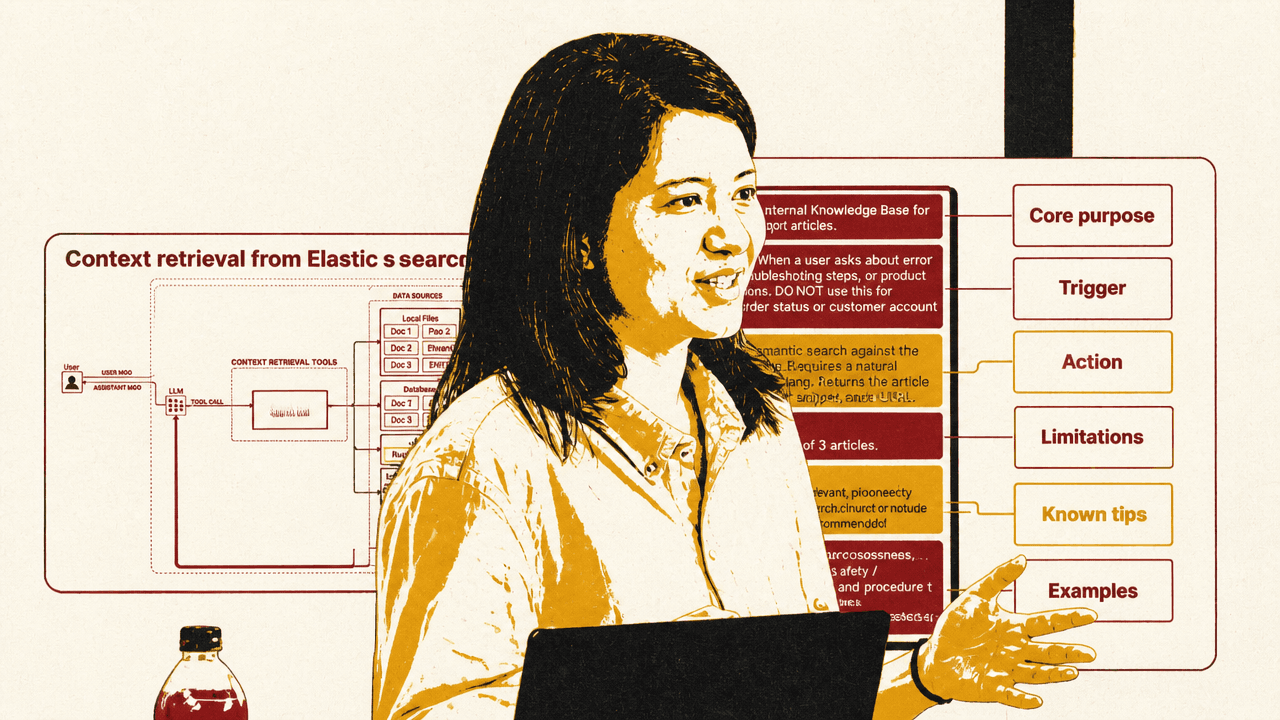
The context-engineering diagram Monigatti used made that map explicit. A user message flows to an LLM; the LLM can call context-retrieval tools; those tools reach into local files, databases, the web, and long-term memory; the results then join the system prompt, tool list, memory, history, user message, tool calls, and tool results inside the context window. Her point was that the middle layer — the search tools — determines which pieces of the outside world become available to the model.
The shell tool complicates the picture further. In LangChain it is called a shell tool; Anthropic calls a similar capability a bash tool; OpenAI’s version was referred to as an exec tool. The shared capability is that an agent can run terminal commands. That makes the shell unusually versatile: it can list files, use grep, call CLIs, run scripts, query databases through custom command-line tools, use curl against HTTPS endpoints, or even perform web-like interactions if the environment allows it.
That versatility raises the practical question Monigatti used to organize the session: if an agent can use a shell, does it still need specialized retrieval tools? Her answer was not a single replacement. Good search is difficult enough that different techniques remain useful: vector search, keyword search, dense embeddings, sparse embeddings, multivector embeddings, and different indexing strategies. The right stack depends on search requirements, latency requirements, the kinds of questions users ask, and how capable the model is at using complex tools.
Agentic RAG fixes fixed retrieval, but creates tool-selection failures
The baseline Monigatti contrasted against was conventional retrieval-augmented generation: a fixed retrieval pipeline where the user message is used more or less verbatim as a search query, typically against a vector database. Retrieved chunks and the user message are placed into the context window and passed to the LLM.
That design has two obvious failure modes. It retrieves even when no additional context is needed, which can confuse the model. It also retrieves only once, which is inadequate for questions that require multi-hop retrieval. A first search result may reveal that a second query is needed, but a fixed pipeline has no mechanism for deciding to search again, rewriting the query, or stopping.
Agentic RAG replaces the fixed retrieval pipeline with a search tool the model can choose to call. The agent can decide whether it needs external context, inspect the result, and search again with a modified query if needed. In the simplest version, however, it is still only searching one source, such as one database.
Context engineering extends that setup to multiple sources and multiple tools. That creates three failure modes Monigatti emphasized from Elastic’s work helping internal and external teams build agents over Elasticsearch data.
First, the agent may not call any tool. It may decide it can answer from parametric knowledge and skip retrieval entirely. Second, it may call the wrong tool. Monigatti gave the example of a colleague whose hardest problem was getting an agent to call the database search tool instead of the web search tool. Third, it may call the right tool with the wrong parameters. The more complex the tool interface, the more likely this becomes.
The corrective starts with tool descriptions. Monigatti acknowledged that this advice can feel obvious, but said tool descriptions are often treated as an afterthought: a single sentence for the interface the model must decide whether and how to use. She recommended treating tool descriptions as prompt engineering surfaces. A robust description can include the tool’s core purpose, triggers for when it should and should not be used, the action it performs, limitations, relationships to other tools, and examples.
The “relationships” part matters when a tool should be used only after another step: for example, first load an agent skill, get confirmation, or consult another source. If an adequate tool description still fails, Monigatti recommended reinforcing the intended behavior in the agent’s system prompt.
Parameter complexity is the second control surface. A tool like get_customer_by_id(id) has a simple parameter schema. A semantic search tool that accepts a natural-language topic is also relatively easy. A search tool that takes topic, filter, and top_k is more demanding. A general-purpose query execution tool, where the agent writes a full SQL or ES|QL query from scratch, is significantly harder. Monigatti’s view was not that such tools should be avoided, but that builders should expect to help the agent when parameter generation becomes complex.
A semantic search tool works until the query needs exactness, filters, or aggregation
The conference-session corpus used in the demonstration was already chunked and stored in a local Elasticsearch cluster. The database contained a text field composed of each session’s title and description, embedded for vector search, plus metadata fields including title, day, time, room, type, and speakers. Because the metadata was not embedded, it could be used for filters but not for semantic search.
Monigatti used LangChain to keep the agent scaffolding simple. The visible notebook configured ChatOpenAI with model="gpt-4o-mini", an API key and base URL through LiteLLM, and temperature=0.5. The agent was assembled with an LLM, a system prompt, and one search tool. The system prompt identified the agent as a search agent answering questions about the conference and told it to decide whether it needed additional context before answering. It also described the Elasticsearch index schema.
The semantic search tool itself was deliberately simple. It accepted a single string query, called vector_store.similarity_search(query, k=3), and returned three formatted results. LangChain’s @tool decorator converted the Python function into an agent tool; the function name became the tool name and the docstring became the tool description.
Monigatti pointed out that the docstring violated her own advice by being short. It worked only because there was one search tool available. With one tool, the agent did not need to arbitrate among competing retrieval interfaces.
On a straightforward query — “Which sessions discuss regulatory constraints in AI systems?” — the agent behaved as a typical agentic-search demo would hope. It called the semantic search tool, generated an expansive query about regulatory constraints, law, regulation, compliance, governance, the EU AI Act, and policy constraints, retrieved the relevant session by Bilge Yucel, and then searched again with a rewritten query before answering.
The brittle part appeared when the query required something closer to keyword matching. Monigatti asked: “Which sessions should I visit to learn more about GEPA?” The agent called the semantic search tool with GEPA, but semantic search returned irrelevant results, including a session about DeepMind’s Gemma models and other unrelated talks. Monigatti said she knew there was a talk about GEPA or JEPA, but the tool failed to surface it.
The failure was not that the agent refused to search. It did search. The interface was wrong for the query. A single semantic search function with k=3 and no keyword behavior, filters, or broader query capability could handle only a narrow class of requests. Exact acronyms, metadata constraints, and analytical questions expose that narrowness quickly.
General-purpose database queries raise the ceiling but make parameter generation fragile
The next version replaced the semantic search tool with a general-purpose database query tool. Instead of asking the agent for a topic string, the tool accepted an entire ES|QL query to execute against the conference_schedule index.
Leonie Monigatti said she moved to a more capable model for this part because writing full database queries is harder than writing a semantic-search phrase; the visible notebook showed model="gpt-4o-mini". She described ES|QL, the Elasticsearch query language, as a piped query language for filtering, transforming, and analyzing data. The specific syntax was less important than the pattern: the agent now had to generate executable query code as a tool parameter.
She also added error handling to the tool. The function wrapped query execution in a try/except block and returned errors back to the agent instead of crashing the system. This was presented as a general principle: when a tool parameter is complex and the agent may generate invalid input, the tool should return errors in a form the agent can use to self-correct.
When asked the same GEPA question, the agent generated an ES|QL query that looked plausible:
FROM conference_schedule | WHERE text LIKE "%GEPA%" | ... | LIMIT 3
The problem was subtle. ES|QL does not use % as a wildcard character; it uses *. The generated query therefore searched for a literal %GEPA% pattern and returned zero results. Monigatti used this to underline a design issue: zero results may be a valid response, or it may be a failure mode. Tool designers need to decide which case they are facing.
There were several possible fixes. The tool description could explicitly say not to use % as a wildcard. The system prompt could reinforce that rule. A deterministic wrapper could replace common wrong wildcard syntax. Monigatti later acknowledged in Q&A that such a band-aid would have worked for the demo. But she argued it does not scale well: after the wildcard issue, the next syntax error will require another patch, and eventually the system prompt becomes a hand-written reconstruction of the database documentation.
Her more robust demonstration used an agent skill. The skill had a name, a short description injected into the system prompt, and fuller content that could be loaded into the context window when needed. Monigatti described this as progressive disclosure: the agent initially sees the existence and purpose of the skill, but the full instructions are loaded only on demand.
The custom ES|QL skill contained basic syntax instructions, including the wildcard rule. She then modified the database query tool description to state that the agent should always use the Elasticsearch ES|QL skill to generate the query before executing it. She reinforced the same instruction in the system prompt.
On the next GEPA query, the agent first loaded the ES|QL skill, then generated a valid query using *GEPA*, and found the relevant session. The tool stack had changed in two important ways: the search interface became more powerful, and the agent received procedural support for using that interface correctly.
The advantage of the general-purpose query tool was not limited to exact matching. Monigatti asked, “How many sessions are on April 8th?” The agent loaded the ES|QL skill, generated a filtered aggregation query, and returned that there were 27 sessions. She contrasted this with retrieving all sessions from that day and asking the LLM to count them. That would fill the context window and rely on the model for counting, which she noted LLMs are notoriously bad at. Pushing counting into the query engine is both more efficient and more reliable.
The shell can search, inspect, and compose, but it is not a search strategy by itself
Monigatti also examined the claim that “all an agent needs is a shell tool and a file system.” She moved the same conference data into local files. A session_data folder contained subfolders by session type, such as keynotes and workshops, with one text file per session. Each file contained a title, metadata, and description.
The agent’s system prompt was adjusted to describe the local filesystem instead of an Elasticsearch index. Monigatti said she used a smaller model again for this part because LLMs are generally good at navigating filesystems and writing shell commands.
She gave a safety warning: shell access is powerful and risky. An agent with terminal access can delete files or take actions the builder did not intend, and LangChain’s built-in shell tool has no safeguards by default. Her recommendation was to use it only in a sandboxed environment.
With the shell tool available, the GEPA query worked. The agent ran commands to inspect the folder structure and search the files:
ls -R ../data/session_data | head -n 50; grep -Ril "GEPA" ../data/session_data | head -n 50
It found one matching session file, then used cat to read the file content and answer with the session information.
The shell example also showed why shell access can appear surprisingly capable. grep is exact-match and regex-based, but the agent can approximate semantic search by generating synonym expansions. When asked which sessions discuss handling regulatory constraints, it first searched for a stem like regulat, then chained terms such as compliance, constraint, GDPR, governance, and sovereignty. That strategy found the session by Bilge Yucel and allowed the agent to answer correctly.
Monigatti’s assessment was pragmatic: it works, but it is probably not the most efficient way to do semantic retrieval. She gave a hypothetical: if the user asks for movies with animal superheroes, should the agent enumerate every animal and search for all of them? It may work sometimes, but it is not a robust semantic search strategy.
The shell becomes more useful when paired with specialized CLIs. Monigatti showed jina-grep, a semantic-search alternative to grep, noting that there are other tools in the same space, including LlamaIndex’s SemTools and Lighton’s colgrep. She installed the jina-grep CLI, then updated the system prompt to tell the agent that it had access to it and when to use it.
The prompt distinguished between exact and fuzzy search: use grep, find, and cat for exact substrings, known filenames, or simple pattern matching; use jina-grep for natural-language or fuzzy queries over many local .txt files.
On the regulatory-constraints query, the agent inspected the folder structure and then correctly used:
jina-grep --top-k 10 'regulatory constraints' ../data/session_data
This found the relevant session on the first try, along with other top-k results. The difference from synonym-chained grep was that the shell still provided the execution substrate, but the actual search behavior came from a more appropriate retrieval tool.
The retrieval stack is a balance between low floor and high ceiling
Leonie Monigatti’s practical recommendation was to stop looking for one silver-bullet retrieval interface. A useful agent often needs a curated set of search tools.
Specialized tools are easier for agents to use. They have simple parameters, produce fewer mistakes, do not require the strongest model, and can be efficient because the agent does not need many iterations. The semantic search tool from the first demo is one example. A customer lookup by ID would be another. These tools provide what Monigatti called a “low floor”: the agent can use them out of the box with a low error rate.
General-purpose tools provide a “high ceiling.” They let the agent handle unexpected, ambiguous, or complex requests that the specialized tools do not cover. The shell tool and the ES|QL execution tool were her main examples. Their weakness is that they are harder to use: the agent may require more iterations, make parameter mistakes, or need additional documentation through skills.
The slide for this recommendation made the tradeoff explicit: “Specialized tools” were described as easy to use but unable to handle complex tasks; “General purpose tools” were described as good for ambiguous tasks but difficult to use. Monigatti framed the target stack as “low floor, high ceiling” — easy paths for common behavior, expandable paths for hard or unexpected behavior.
| Interface | What it gave the agent | Where it broke or needed help |
|---|---|---|
| Semantic search tool | A simple natural-language query interface over the Elasticsearch conference index | Failed on the GEPA acronym case and lacked filters or aggregation |
| ES|QL execution tool | A high-ceiling database interface for exact matching, filtering, and aggregation | Required the agent to generate valid query syntax; the first GEPA attempt used the wrong wildcard |
| Agent skill for ES|QL | On-demand syntax guidance loaded before query execution | Required explicit tool-description and system-prompt guidance so the agent would load it first |
| Shell tool with grep | Filesystem inspection, exact matching, regex search, and file reading | Can be risky without sandboxing and approximated semantic search through inefficient synonym expansion |
| Shell tool with jina-grep | Semantic search over local files through a CLI | Still required prompt guidance about when to use grep versus jina-grep |
The right stack, in Monigatti’s recommendation, is a balance. If the agent has only specialized tools, it may fail when a user asks something outside their narrow design. If it has only general-purpose tools, it may burn tool calls, generate invalid commands, or require a stronger model than the use case can afford.
When builders do not yet know their users’ query behavior, Monigatti recommended starting with general-purpose tools, logging what breaks, and then adding purpose-built interfaces. If an agent takes four or five tool calls to answer a routine question, she treated that as a signal that the available tool may be too difficult or too general for the task. If the logs show repeated patterns, those patterns are candidates for specialized tools.
She said she had done this in her own testing with an agent that initially had only an exec tool. After a few days of database-related work, she asked it what patterns it saw, and it recommended specific database search tools to implement.
In Q&A, a participant asked whether the required tool stack depends on the model. Monigatti said Elastic’s internal testing showed that a more powerful model can substantially reduce parameter error rates, though she did not cite exact numbers. But she cautioned that a stronger model does not eliminate errors. More capable models help with general-purpose tools, but they do not make tool design irrelevant.
Another participant asked whether practical systems should combine database and shell tools and validate results across them. Monigatti said yes, noting that her demos showed one tool at a time for clarity, while real systems often have multiple tools. She then recalled a blog post she believed was by Vercel that compared agents with a bash tool, file search tools, database tools, and a hybrid of bash and database access. In her telling, the hybrid version achieved the highest accuracy in that experiment because it first used the database tool and then verified results with the shell tool. She presented this as an example of an interesting observed agent behavior, not as a universal benchmark result.
Latency, thresholds, skills, and sub-agents remain unsettled design choices
The Q&A exposed several unresolved edges in agentic search.
One question concerned latency. Agentic RAG can require multiple tool calls, making it slower than fixed RAG. The participant asked whether systems should include a second, simpler RAG pathway for fast answers and how the agent should choose between the two. Monigatti did not claim a settled answer. She said conventional RAG remains effective for many use cases despite repeated claims that it has been superseded. But deciding when to switch between RAG and agentic RAG likely requires some kind of agentic routing logic, and she did not offer a specific design.
Another question concerned deterministic correction. If an ES|QL query fails because the agent uses SQL-style % wildcards, why not simply replace % with *? Monigatti agreed that this specific fix worked when she built the demo. Her objection was not that deterministic normalization is invalid, but that one-off fixes become fragile as errors accumulate. For one known failure, a short instruction or rewrite rule may work. For a robust system, skills or documentation loading can be a cleaner way to provide a broader operating manual.
A participant also asked about thresholds for semantic retrieval. In practice, semantic search systems often use thresholds to suppress weak matches. In an agentic setting, should the threshold be conservative to avoid confusing the agent, or can the agent reason over imperfect results? Monigatti said agents today are better at filtering irrelevant search results from a result set. In the jina-grep example, top-k results included some irrelevant items, and the agent could still identify the relevant one. The longer-term issue is context pollution: irrelevant search results can remain in the context window during extended conversations and may confuse the agent later. Her answer was use-case dependent: agents can often filter result relevance in the moment, but long-running sessions make irrelevant context more dangerous.
On sub-agents, Monigatti said she had not personally worked with them. She said she believed Claude Code uses sub-agents for specific search tasks or niche questions, based on a blog post she had seen, and described the pattern as outsourcing specialized expertise to a sub-agent. She considered that interesting but did not present it as experience-based guidance.
The final technical question concerned skills and context management. If the main benefit of skills is that only descriptions are visible until the full skill is needed, when should full skills be removed from the context window? Monigatti deferred to her Elastic colleague Joe, who described using a file store to offload context. In his description, skill names, descriptions, and file-store locations are kept available; full skill definitions are loaded when needed and later offloaded as the context progresses. The same file-store approach can support compaction and retrieval of previous tool results, including through tools that can grep the file store.
That answer reinforced the broader theme: context engineering is not just “add retrieval.” It is a system for deciding what should be visible now, what should stay latent, what should be loaded on demand, and which search interface is responsible for finding it.