Coding Agents Work Best When Products Expose Simple Tools

Matthias Luebken argues that coding agents such as OpenClaw are less mysterious than they appear: they are LLMs calling tools in a loop, made more useful by a runtime, shell, sessions and product hooks. In his Tavon talk, he uses Pi, a minimal coding-agent SDK, to show how that loop can be embedded inside business software, including a sales workflow where RFP emails are routed to customer-specific agent sessions and returned to users as draft replies. His architectural point is that teams should not force agents through opaque systems, but expose data, commands and controls in forms coding agents can use cleanly.
Coding agents look like new intelligence because the runtime gives them more to try
Matthias Luebken’s central claim is deliberately deflationary: an agent is an LLM running tools in a loop, and a coding agent is the same loop with a runtime and a shell attached. The useful work begins once that simplicity is accepted.


An agent is actually just an LLM agent that runs tools in a loop.
The loop, as Luebken described it, has a goal, context such as an AGENTS.md file, tool calls, tool results, and repeated iterations until the assistant can complete the task. In a coding agent, the loop adds “a runtime and some type of shell,” usually Bash. That addition is what makes systems like OpenClaw appear to handle capabilities they were not explicitly given.
His example came from an OpenClaw demonstration in which an incoming voice message was handled even though, as Luebken understood it, OpenClaw did not have an explicit voice-message capability at the time. The agent found and used available tools, including ffmpeg on the local machine. “From the outside, it looks like learning,” he said. “But in the inside, it’s actually just another tool call that is available to the agent.”
That distinction matters for product embedding. The lesson is not that the agent has acquired a new human-like capability. It is that the operating environment gave the model tools it could call, and the model was able to combine them through repeated tool use. The practical question becomes what commands, files, APIs, sessions, and UI hooks are made available so the agent can make progress without compensating for avoidable complexity.
Luebken framed this as the first architectural pattern he sees emerging: “Make it easy for coding agents.” The pattern is broad, but he used it in a concrete sense. Do not make agents compensate for opaque systems, awkward data layouts, or complex access paths. Shape the interface around what coding agents are good at: reading files, using CLIs, running commands, inspecting outputs, editing state, and iterating.
He connected this to the Unix philosophy, citing Ken Thompson’s line: “Write programs that do one thing and do it well.” In the agent context, small tools become usable capabilities. If an agent can find, understand, and compose those tools, then a product can expose complex workflows through relatively simple pieces.
Claude’s “CoWork” and its Excel skill were Luebken’s example of this pattern appearing in a product surface. On screen, the skill appeared to let an AI work with spreadsheets. His point was that it does not simply “talk to Excel” as a monolith. It uses a set of small tools and libraries — pandas, openpyxl, LibreOffice components — packaged into a skill that makes spreadsheet work available to the agent.
The “magic,” in this account, is often ordinary tool execution made legible and available to an LLM loop.
Pi is valuable because it is small enough to pull apart
Luebken approached Pi through OpenClaw, not because he was most interested in “all the craziness things that people are doing,” but because he wanted to understand how these systems work. Pi, in his account, is useful precisely because it is minimal, open source, and easy to inspect.
A slide from pi.dev described Pi as “a minimal terminal coding harness” that skips features such as subagents and plan mode. It can read and understand code, execute commands, edit files, search and navigate, and use a headless browser. The slide also showed installation via npm install -g @mariozechner/pi-coding-agent, described it as MIT-licensed, and credited Mario Zechner. Luebken added that Zechner was joining Earendil, which he described as “awesome.”
The important instruction was not to admire Pi from a distance, but to try it. Luebken repeatedly encouraged the audience to open Pi and ask it to build something. In his view, Pi is a good learning substrate because it is possible to “rip things apart and put things together.”
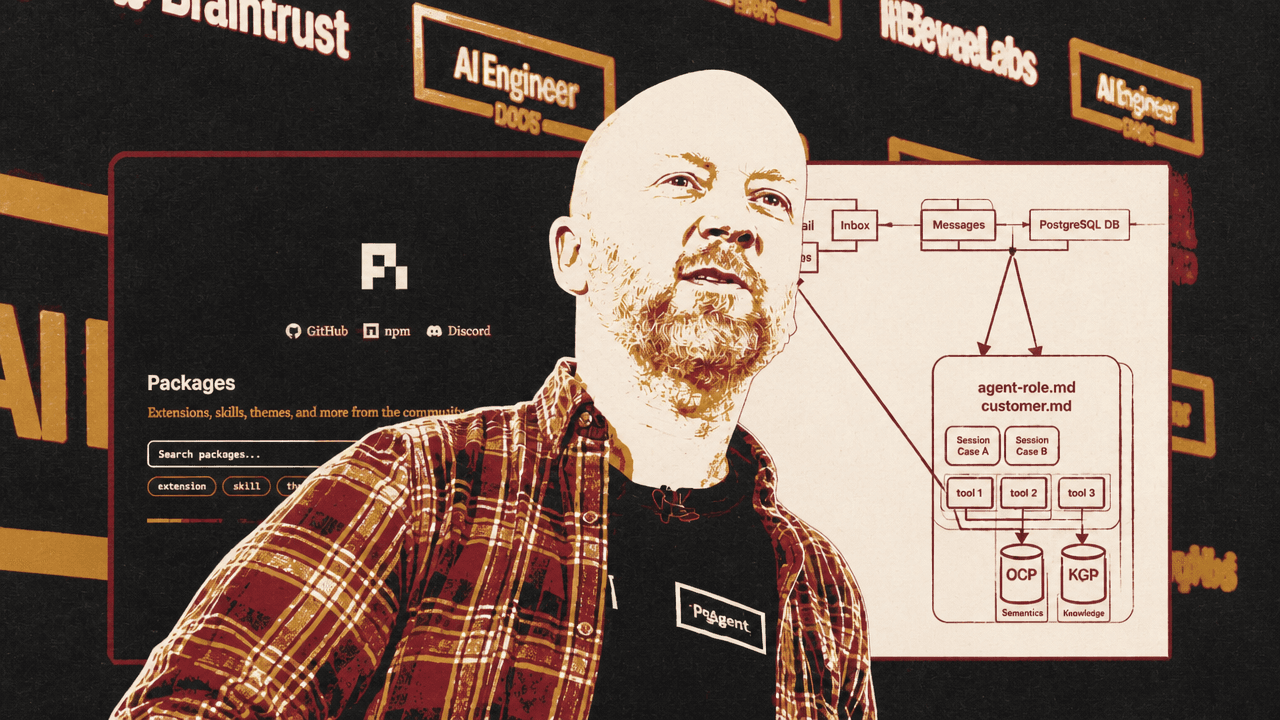
Pi’s package ecosystem also matters to that tinkering model. Luebken showed the Pi packages page, with extensions, skills, themes, prompts, and many packages discoverable through npm. He did not treat the package list as a finished platform strategy. He treated it as evidence that builders can explore, download, extend, and assemble pieces around the minimal harness.
The broader context is still unsettled. Luebken used Mario Zechner’s phrase that “we are in the fuck around and find out phase of coding agents.” He emphasized that what he was showing reflected what he knew “today,” and that if he gave the talk again in a few weeks it would probably be different. He also showed a fake O’Reilly-style book cover titled “Enterprise Coding Agent Patterns” with the joke line: “Your agent will hallucinate these patterns anyway.” No authoritative enterprise pattern book exists yet. There are emerging patterns, especially in coding-agent systems, but builders are still finding them through experimentation.
The core agent is only a loop, but the embedding hooks are where product behavior appears
Before thinking about OpenClaw or product embedding, Matthias Luebken argued, it is useful to look at @mariozechner/pi-agent-core and understand the underlying mechanics.
In the TypeScript API he showed, an Agent is initialized with state: a system prompt, a model, a thinking level, tools, and messages. The API can also accept prompts, including text and image prompts, and can continue from the current context after an error. Luebken did not dwell on the full constructor as a formal API lesson; he used it to show that the agent is a configurable loop whose inputs, context, tools, and messages are under the application’s control.
The event system is central if the agent is to be embedded into an application rather than merely run in a terminal. A surrounding product can subscribe to lifecycle and streaming events: when an agent starts, when a turn begins, when a message streams, when a tool execution starts, updates, ends, and when the agent finishes. Those events allow the host application to show progress, log behavior, surface tool activity, or build a live UI around the agent’s work.
His toy example was a CRM lead qualifier. The terminal app let a user type commands such as “Show me all new leads and score them” or “Qualify all contacts and recommend who to prioritize.” The agent searched contacts with status new, called score_lead for three contacts, and returned a prioritized table. In the visible output, Sarah Chen at TechNova scored 75 and was labeled hot, Lisa Park at HealthBridge scored 70 and was also hot, and Tom Rivera at PixelCraft Studios scored 19 and was cold.
| Lead | Company | Score | Tier |
|---|---|---|---|
| Sarah Chen | TechNova Inc | 75 | Hot |
| Lisa Park | HealthBridge | 70 | Hot |
| Tom Rivera | PixelCraft Studios | 19 | Cold |
The system prompt for that example defined the agent as a CRM Lead Qualifier assistant and listed its tools: search_contacts, score_lead, update_contact, and log_interaction. It instructed the agent to search for relevant contacts, score them — including scoring multiple leads in parallel — recommend priorities, and offer to update status and log interactions. It also told the agent to be concise and use tables when comparing leads.
The example was intentionally simple. Luebken said he had “vibe-coded this away” and treated it as a learning exercise. But the hook he emphasized shows where a product can decide what the agent is allowed to do. A beforeToolCall hook can require confirmation before write operations such as update_contact or log_interaction. In his code example, the hook builds a human-readable description of the proposed update or log entry, asks for confirmation, and blocks the tool call if the user declines.
That is where enterprise controls can be inserted: role-based access, authorization, confirmation, policy checks, or other guardrails before an agent changes state. The core loop may be simple, but the surrounding application can decide when the loop can read, write, ask, stream, or stop.
The coding-agent version turns files, commands, and UI into the agent’s working surface
Luebken then recast the CRM example as a coding-agent example. Instead of only exposing typed tools through pi-agent-core, the coding agent receives a file layout, command instructions, and a runtime.
The AGENTS.md file he showed defined contacts as markdown files in a contacts/ directory with YAML frontmatter for structured fields such as ID, name, status, and score. Interactions were markdown files in an interactions/ directory, named with dates and contact IDs. The file explained that the agent could search contacts with grep -ri "pattern" contacts/ or ls contacts/, then read individual files for details.
Lead scoring was also specified in the file. Company size, annual revenue, industry fit, role authority, and recency each contributed points. Tiers were defined as hot at 80 or above, warm at 50 or above, and cold below 50. After scoring, the agent was told to update the score field in frontmatter using edit. Updating contacts and logging interactions were similarly described as file operations, with confirmation required for edits.
This is “make it easy” in a different form. Rather than requiring the model to infer where business state lives or how to mutate it safely, the product gives the agent a data layout and permitted commands. The coding agent can then use its normal strengths: inspect files, search, edit, and run commands.
Pi’s coding-agent extension API adds another layer. Luebken highlighted session events and UI interaction as the parts he was most interested in. The slide listed session lifecycle hooks and UI methods such as ctx.ui.select(), ctx.ui.setWidget(), and ctx.ui.setFooter(), along with agent-loop, message-streaming, and tool-execution events. For his embedding argument, the important point was that extensions can touch both the agent’s work session and the interface a user sees.
His CRM extension registered a /pipeline command. When invoked, it loaded all contacts, presented a selection UI, let the user pick a contact, then let the user choose an action. The terminal UI could show a list of contacts — for example, Sarah Chen at TechNova, Marcus Johnson at RetailFlow, Lisa Park at HealthBridge, Tom Rivera at PixelCraft Studios, and Anika Patel at FinServ Global — and then a contact-detail view with selectable statuses such as new, contacted, qualified, unqualified, and customer.
This was still a coding-agent UI, not a finished general-purpose application framework. Luebken cautioned that Pi’s current framework is “catered towards the use cases of a coding agent,” and that there is “lots of work” required to make it ready for other application types. But the direction interested him: the same extension mechanism can expose not just backend commands and session lifecycle, but also interactive product surfaces.
The web UI portion remained provisional. Luebken first said that moving the terminal interaction to the web was “currently not possible.” He then showed a web UI he had asked Pi to build: a localhost “pi web coding agent” with /pipeline autocomplete and a modal-style “Select a contact” interface using the same command and selection pattern. He noted that refactoring was underway to make this cleaner and more accessible. The tension is part of the point: the framework was not yet presented as web-ready, but the same agent machinery could already be pushed toward a web surface through experimentation.
OpenClaw uses Pi’s core mechanics, but adds platform hooks for a different operating model
Luebken described OpenClaw’s use of Pi as “a special setup.” Pi in OpenClaw is not a single agent in a single coding session. It operates in a multi-channel, multi-agent environment with multiple threads and agents.
The package stack he showed tied OpenClaw directly to Pi’s components. OpenClaw uses pi-ai for a unified LLM abstraction layer, pi-agent-core for types such as AgentMessage, Tool, and Event, pi-coding-agent for session and tool management, and pi-tui for its terminal interface.
| Pi package | Role in OpenClaw |
|---|---|
| pi-ai | Unified LLM abstraction layer |
| pi-agent-core | Type system for AgentMessage, Tool, and Event |
| pi-coding-agent | Session and tool management |
| pi-tui | OpenClaw terminal interface |
The call chain on the slide ran from OpenClaw’s runEmbeddedPiAgent() to runEmbeddedAttempt(), then to createAgentSession() from @mariozechner/pi-coding-agent, then to a new Agent from @mariozechner/pi-agent-core, and finally to streamSimple() from @mariozechner/pi-ai.
OpenClaw is therefore not separate from the Pi mechanics Luebken had explained. It builds on them. But OpenClaw also has its own plugin hook system because its use case has different requirements.
The OpenClaw slide listed hooks for multi-channel routing, including inbound_claim, before_dispatch, reply_dispatch, message_received, message_sending, and message_sent. It listed model provider orchestration hooks, sub-agent management hooks, gateway lifecycle hooks, session lifecycle hooks, message persistence hooks, observability hooks for llm_input and llm_output, and compaction hooks at the runner level.
One mismatch was especially specific: some OpenClaw hooks sit on the “hot write path” for message persistence, such as tool_result_persist and before_message_write. The slide stated that these are synchronous hooks, and that Pi’s async extension model cannot serve this requirement. The conclusion was not that Pi is insufficient, but that OpenClaw’s platform-level use case requires additional wrapping around Pi’s core mechanics.
The product example hides the agent and leaves the user in email
The most concrete product example was an application built for a client around a sales process. The company receives requests for proposals by email for parts sold through another system. Luebken’s design removes the coding-agent interface from the end user’s experience. The user sees incoming emails and generated drafts; the agentic machinery runs underneath.
The architecture starts with an inbox monitor. Incoming email goes to a gateway, which routes messages to different agents. In the design he showed, there is one agent per customer. Each agent has a general role file, such as agent-role.md, explaining how the agent should use the system and respond to inputs and outputs. It also has a customer.md file containing customer-specific context: quirks, access, discounts, and related details.
Each case is represented as a session. Luebken said he likes using sessions because the system can create and reuse existing sessions, allowing the agent to know what had previously been discussed. An email is associated with a case, and that case maps to an agent session.
The agents then use tools to talk to CRM and ERP systems. Tavon’s current way of exposing those tools is through CLIs, because “agents are really good at using CLIs.” The data is secured in a sandbox, and the agent uses the tools to retrieve the right business information before generating a draft reply.
| Layer | Role in the QuoteGen workflow |
|---|---|
| Inbox | Receives and monitors incoming RFP emails |
| Gateway | Routes relevant emails to the right customer agent |
| Agent context | Combines a general role file with customer-specific instructions |
| Session case | Preserves the case history across back-and-forth work |
| CLI tools | Expose CRM and ERP data in a form the agent can use |
| Drafts | Return a reviewable email response to the user |
The visible product, called QuoteGen in the demo, had an admin dashboard with inbox, drafts, cases, clients, and settings. The inbox view showed incoming German-language emails. Most emails were ignored, but one request for a quote was classified as relevant and associated with a case such as QC-001. Luebken explained that this classification came from an LLM call: the system decided “I’m interested in this” and linked the email to an agent session.
The draft view showed the output: a generated German sales email responding to the request. In one visible draft, the agent addressed Frischgut Lebensmittel GmbH, listed requested parts such as RMB-5090 and RMB-3020, included quantities, unit prices, net totals, a total of €1,850.00 net plus VAT, and a three-working-day delivery time. Another visible draft followed the same pattern with different part numbers, availability language, pricing, and a “Save Changes” and “Demo Send” interface.
For the user, the intended experience is not an agent chat. Luebken’s phrase was: “Let the user stay in an email, let them stay in the inbox and drafts.” The admin interface exists to inspect and manage the system, but the operational output is a draft email the human can review, edit, save, or send.
Under the hood, the session logs showed the agent performing tool calls. One log included parts_lookup for RMB-5090, returning a found part described as “Dichtungssatz Abfüllanlage,” with a net price of 34.5, 120 available, and a lead time of 3. Another lookup for RMB-3020 returned “O-Ring Set FDA konform,” with a net price of 19.75, zero available, and a lead time of 14. A later session view showed the same mechanism with different records: RMD-3010 with unit price 34.5, availability of 100, and a seven-day lead time, and RMA-3020 with unit price 15.7, availability of 50, and a seven-day lead time.
This is the same loop as the toy CRM demo, but embedded in a workflow that a sales team already understands: email in, case association, lookup, draft out.
Sandboxing remains an open part of the design
Luebken treated sandboxing as important but unfinished in the product architecture. In one architecture slide, the agent role files, customer context, case sessions, and tools sat inside a larger boundary labeled “NVIDIA/OpenShell Sandbox,” with “Open Policy Agent” also shown.
He was careful not to present that as a fully adopted or completed component. “To be honest, we’re just on the steps of getting there,” he said about sandboxing. He pointed to NVIDIA’s OpenShell work around OpenClaw as “really, really interesting” and described it as one way of securing an agent. Tavon was looking into it; the talk did not claim the client deployment had already standardized on it.
In the examples he showed, boundaries appear at several levels. In the small CRM example, a beforeToolCall hook asks for confirmation before write operations. In OpenClaw, platform-level hooks handle routing, persistence, provider orchestration, observability, and compaction. In the QuoteGen application, CRM and ERP access is exposed through CLIs inside a sandbox. Luebken did not present these as a complete security blueprint. He presented them as the controls that become necessary when the goal is to make useful tools easy for agents to reach.